
Start Your Workflows Straight From Slack Activity
If your team lives in Slack, a lot of your real work starts there. Someone sends a message, mentions your bot, joins a channel, or drops an emoji reaction on a bit of feedback. Until now, catching that meant actually watching the channels yourself.
Not anymore. You can now kick off a workflow in your account straight from Slack activity, with five new instant triggers.
What you get
Five new ways to start a workflow the moment something happens in Slack:
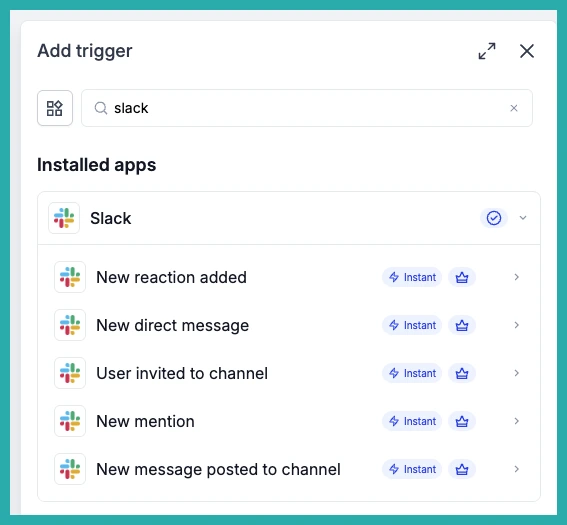
- New direct message - fires when someone sends a direct message to your Slack app (the bot).
- User invited to channel - fires when someone joins or is invited to a channel you choose.
- New mention - fires when your Slack app gets @-mentioned in a channel it's been added to.
- New message posted to channel - fires when a new message lands in a public or private channel you pick.
- New reaction added - fires when an emoji reaction is added to a message in a chosen channel.
That Slack activity becomes a step you can build on - routing requests, welcoming new teammates, and pinging the right people automatically.
How to set it up
It's the same path you already know for any trigger.
- Go to Automation, then Workflows, and open the workflow you want (or start a new one).
- Click Add trigger and search for Slack.
- Pick the trigger you want from the five above.
- Select your connected Slack account.
- Set the channel or any filters where they apply, and you're done.
In the screenshot below, you'll see the new Slack triggers sitting in the Add trigger panel, ready to choose.
A few handy ways to use it
- Route incoming requests - notify a triage channel when someone messages or @-mentions your Slack app.
- Welcome new teammates - post an onboarding message when someone joins your team's channel.
- Follow up on feedback - alert reviewers when a message in a review channel gets an emoji reaction.
- Keep teams in the loop - notify another team when a new message hits a shared request channel.
Two quick notes
These are Premium triggers. And for the mention trigger to work, make sure the Slack app has been added to the channel first. Channel lists will only show the public and private channels your connected Slack user can see.
If Slack is where your team starts things, pick one trigger and let it carry the load. Thirty seconds of setup saves you a lot of channel-watching.
