
Start a Workflow Automatically When Your Google Sheets Change
If your business runs on Google Sheets - inquiries, project notes, a running list of leads - you know the drill. Something new lands in the sheet, and then you have to go notice it and do the next thing yourself.
That manual check is now optional. Your account can watch a Google Sheet for you and start a workflow the moment something changes.
What landed
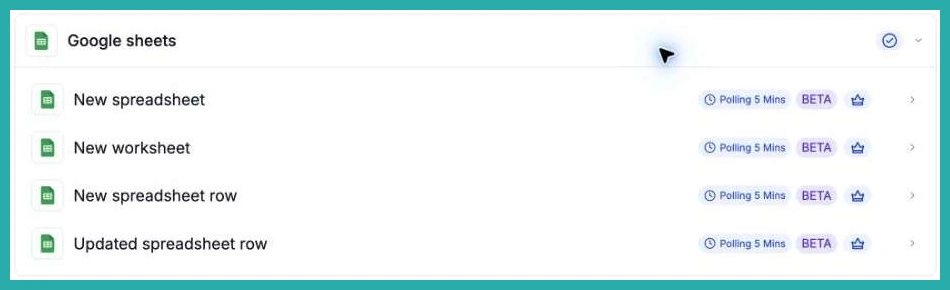
There are four new Google Sheets triggers you can drop into any workflow:
- New spreadsheet - fires when a new Google Sheets file is created in a Drive you choose.
- New spreadsheet row - fires when a new row is added to the bottom of a sheet or tab.
- Updated spreadsheet row - fires when a cell in an existing row is edited. This one does not fire for brand new rows, only changes to rows already there.
- New worksheet - fires when a new tab is added to a spreadsheet.
Pick the one that matches the thing you want to react to, and the workflow takes it from there.
How to set it up
Go to Automation, then Workflows, and open the workflow you want to start (or create a new one). Click Add Trigger, then search for the trigger name or open the Google Sheets category.
In the screenshot below, you'll see the Google Sheets triggers ready to choose from.
From here it's a few quick choices:
- Choose the event - New spreadsheet, New spreadsheet row, Updated spreadsheet row, or New worksheet, depending on what should kick things off.
- Select the source - pick your connected Google account and Drive. For the two row triggers and the worksheet trigger, choose the spreadsheet. For the row triggers, also choose the Sheet (tab).
- Set up the data - select Find new records, choose a mapping reference, and that sheet data becomes available to use in the rest of your workflow actions.
- Test it - save the trigger and workflow, then use Test, then Test using events to run a matching Google Sheets event and confirm it behaves. Publish when you're happy.
Where this comes in handy
- Start a lead intake workflow when someone appends a new inquiry row.
- Move a process forward when a status or detail in an existing row is edited.
- Begin your monthly reporting routine when a new month tab is added.
- Kick off an internal process when a new spreadsheet appears in a chosen Drive.
Two things worth knowing
Google Sheets is marked Premium in the workflow builder, so premium usage charges may apply.
The New spreadsheet row trigger tracks row positions, so always add new records at the bottom. Inserting rows in the middle can retrigger the rows at the end, and deleting rows can cause later new rows to be skipped.
If you've got a sheet your team already lives in, this is a good one to try. Point a workflow at it and let the next step start on its own.
