
Workflow Value Chips Now Have Three Colours, So You Can Tell a Typo From a Deliberate Setup
If you build workflows, you've used those little value chips - the ones like {{contact.first_name}} that fill in personal details when the workflow runs. Until now they only told you two things: the value was fine (blue) or it was wrong (red).
The trouble was, red got used for two very different situations. A real typo looked exactly the same as a value you'd dropped in on purpose to be filled from somewhere else. So a setup you built deliberately read like a mistake.
That's now sorted. Chips have three states instead of two.
The three colours and what they mean
Every value chip now lands in one of three states, so you know at a glance whether you need to act.
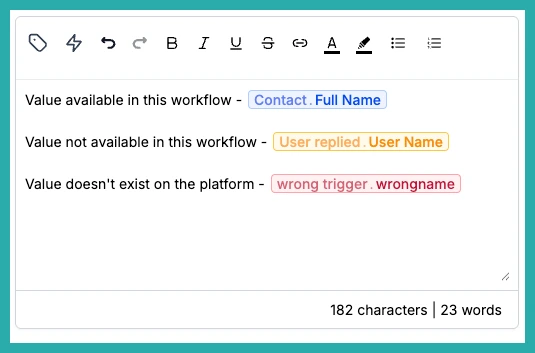
- Blue - the value is available in this workflow. It can be filled, whether from the contact record, a system value like the current date, or an earlier step.
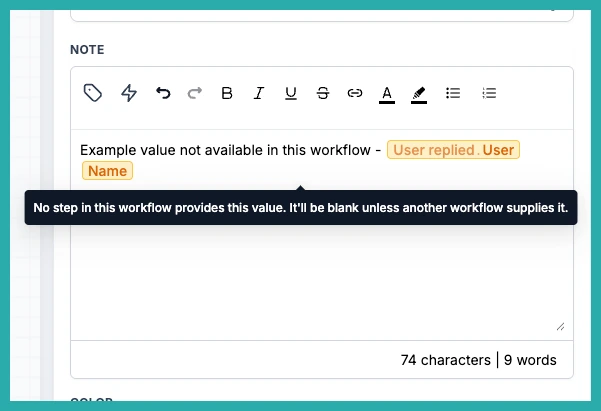
- Yellow - the value is real on the platform, but nothing in this workflow supplies it. For example, a Google Sheets value in a workflow that has no Sheets step. It will render blank unless another workflow passes it in.
- Red - the value doesn't exist on the platform at all. Nothing matches it, so no workflow will ever fill it. This is your typo catcher.
In the screenshot below, you'll see the states side by side so you can spot the difference.
Why yellow is the useful part
Say you drop {{invoice.url}} into an Add Notes action, in a workflow that no invoice trigger starts. Or you hand a value from one workflow to another using Add to Workflow. These are things you did on purpose.
Before, red flagged all of that as unrecognised and pointed you back to the picker, as if you'd got it wrong. Now those cases show yellow instead. It's a heads-up, not a scolding. Yellow means: check whether something else supplies this value.
Red is back to meaning what it should - the value is actually wrong and worth fixing.
In the screenshot below, you can see a yellow chip in a workflow where the value has no source.
A couple of things worth knowing
- Yellow is a warning, not a block. You can save and publish your workflow exactly as normal.
- Red still catches genuine typos, like {{contact.frist_name}}.
- Spacing inside the brackets no longer trips you up. Both {{ attribution.first.url }} and {{attribution.first.url}} now match.
- This is a display change only. Values fill in at run time exactly as they did before, so anything that worked before still works.
Nothing to switch on here - just open any workflow and you'll see the new colours doing their job. Next time you spot a yellow chip, you'll know it's a nudge to check, not a problem to panic over.
