
Your Workflow History Now Goes Back 60 Days, and You Can Export It
Someone tells you a step didn't fire, or an email never went out. You go to check the workflow history and the record you need has already dropped off. Frustrating, especially when the problem gets reported weeks later.
Two changes just landed that make this much easier to deal with.
What you get
Your workflow history now stretches back 60 days instead of 30. That applies to both Execution Logs and Enrollment History, so you have twice as long to look back and work out what happened.
On top of that, you can now export your Execution Logs as a CSV. Pick your date range and filters, and the system sends you a download link by email. You can open it in a spreadsheet, review failed actions, share it with someone helping you, or just keep a copy before it ages out.
How to export your execution logs
Here's the whole thing, step by step.
- Go to Automations, then Workflows, and open the workflow you want to look at.
- Select Execution Logs.
- Apply any filters you need, then click Export at the top right of the toolbar.
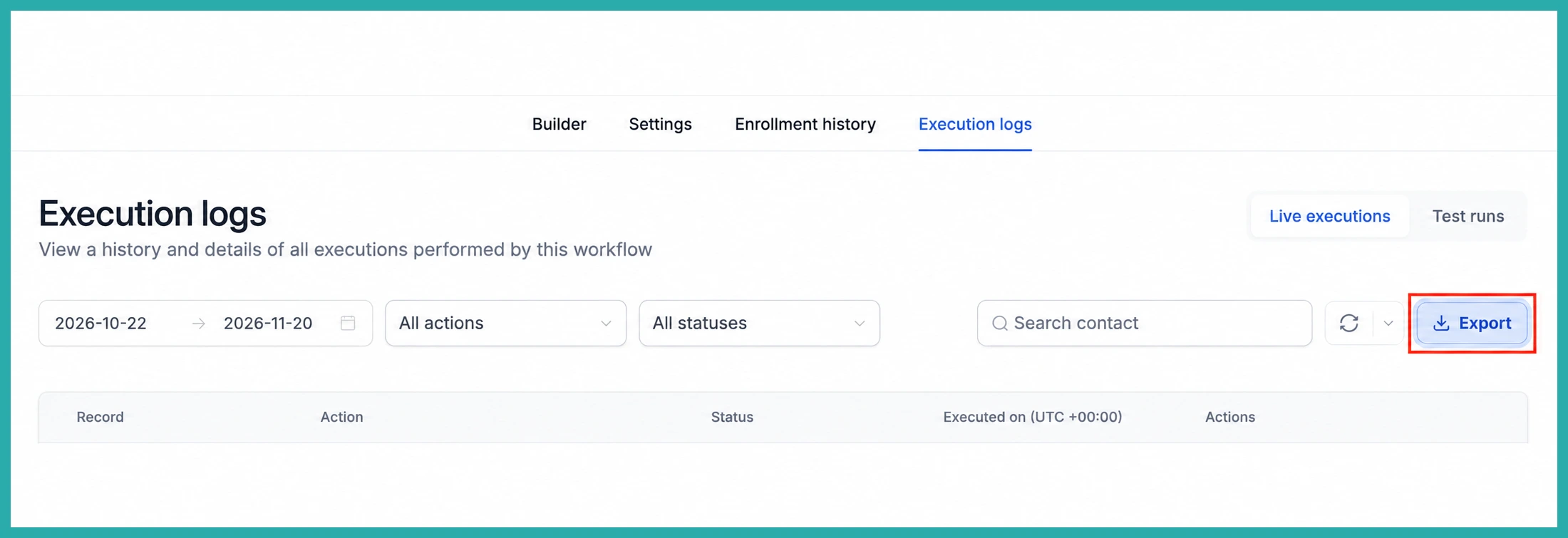
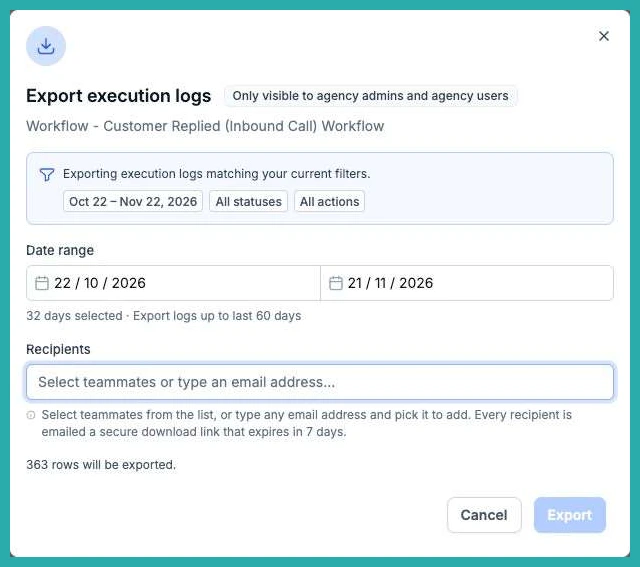
Next you'll confirm what you're actually exporting. Check the export scope and date range - you can pull logs from anywhere in the last 60 days.
- Review the date range and filters.
- Select teammates or type in the email addresses you want the file sent to.
- Click Export to start generating the CSV.
When the file is ready, it arrives by email with a download link. Grab it from there and you're done.
Good to know
- The download link expires after 7 days, so save the CSV if you want to keep your own copy.
- Exported logs contain only action and execution IDs - no personal contact details are included.
- There's a 15-minute wait between export requests, so space them out.
- Enrollment History also gets the longer 60-day window, though CSV export runs through Execution Logs.
If you've got a workflow that's been acting up, you now have more room to dig in and a simple way to keep the evidence. Give it a go next time something doesn't add up.
