
Let Customers Book Appointments in Their Own Language on WhatsApp
If you serve customers across Latin America or Europe, you already know most of them are not messaging you in English. And asking someone to book an appointment in a second language is friction you do not need.
That friction is now gone. WhatsApp appointment booking flows come in 13 languages, so the whole booking experience shows up in your customer's language, on the app they already have open.
What you get
When you build an appointment booking flow, you pick a language, and everything follows. The timezone picker, the date and time selectors, the field labels, the helper text, right through to the confirm button all appear in the language you chose.
There are 11 languages and 13 regional options to pick from: English, German, Spanish, French (France and Canada), Italian, Dutch, Norwegian, Portuguese (Brazil and Portugal), Danish, Finnish and Swedish.
The regional variants matter. French for France reads differently to French for Canada, and Brazilian Portuguese is not quite Portugal's. So the wording matches the market rather than approximating it.
Form flows work in any language at all
Booking flows use a picker because the system generates the experience for you. Form flows are different. Because you write the questions yourself, a form renders in whatever language you type it in. No picker, no list to limit you.
So you can write one intake form in Spanish for your Spanish-speaking contacts and another in English for everyone else, then send whichever one fits the person you are messaging.
How to set it up
- Go to Settings, then Communications, then WhatsApp, then Flows.
- Click Create Flow and choose Appointment booking.
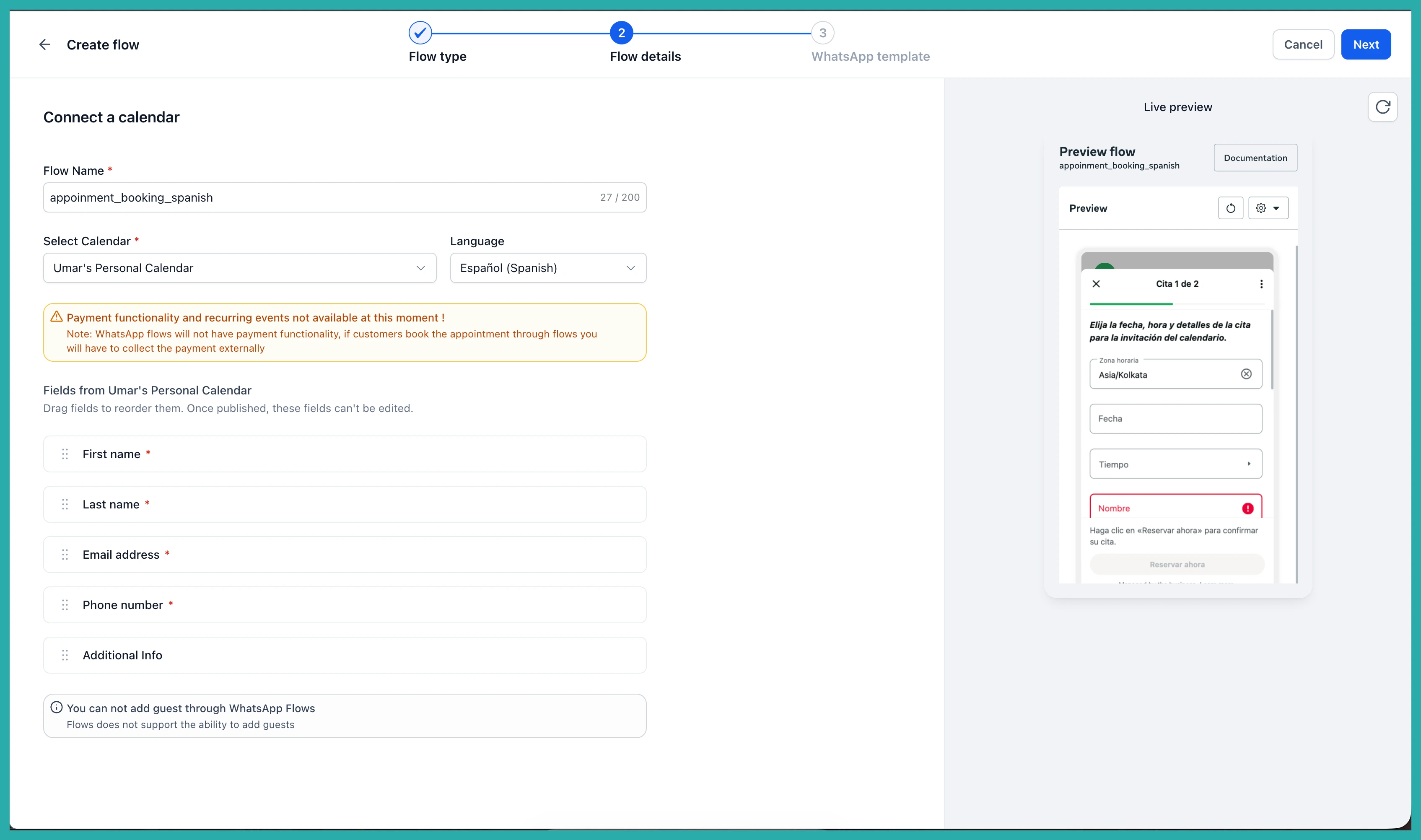
- On the Flow details step, select your calendar, then choose the Language.
- Check the live preview, which renders exactly as your customer will see it.
- Continue to the WhatsApp template step and publish.
In the screenshot below, you'll see the flow details step where you pick your calendar and language, with the preview showing the booking experience in the language you selected.
For a form flow, just write your form in the language you want and send it. The language it is written in is the language your customer sees.
Check before you publish
The live preview renders in your chosen language, so you can read through it and make sure the translation sits well before anything goes out. And once a flow is built, the language shows as a column in your flows list, so you can see your coverage across everything you have set up at a glance.
Where this pays off
- Serving Latin America: Spanish and both Portuguese variants mean your Mexican, Colombian, Peruvian and Brazilian customers book in their own language.
- European audiences: German, French, Italian, Dutch and the Nordic languages cover most of the continent from one setup.
- Mixed audiences: Build the same booking flow in two or three languages and send the right one based on who you are messaging.
Removing the friction of booking in a second language is some of the easiest conversion work available to you. Open Settings, then Communications, then WhatsApp, then Flows, and build your next booking flow in your customer's language.
