
Your Automations Can Now Wait for a Team Member to Reply - and Escalate if Nobody Does
A new enquiry lands. Someone on your team is meant to reply within a few minutes. But you're mid-game, mid-brief, mid-anything, and you don't actually know whether it got answered until much later.
Now your account can watch that for you.
What landed
The Wait step in your automations has a new condition: User Replied. It already knew how to wait for a customer to reply. Now it can wait for one of your team members to reply to the conversation before moving on.
Pair that with a timeout and you've got a proper response-time safety net. The workflow waits for someone to answer, and if nobody does inside your target window, it takes action for you - a nudge, a reassignment, an urgent task, whatever you decide.
How it works
When you add a Wait step and choose User Replied, the workflow pauses. It's watching for two things:
- A team member sends a reply, in which case the workflow carries on straight away.
- Your timeout runs out first, in which case the contact moves down your escalation path instead.
Whichever happens first wins. If you don't set a timeout at all, it simply waits until someone replies.
How to set it up
- Open the workflow you want and add a Wait action.
- Set the wait condition to User Replied, then set an optional timeout - say 15 or 30 minutes.
- Decide what happens next. One branch for when a team member replies in time, and one for when the timeout is hit.
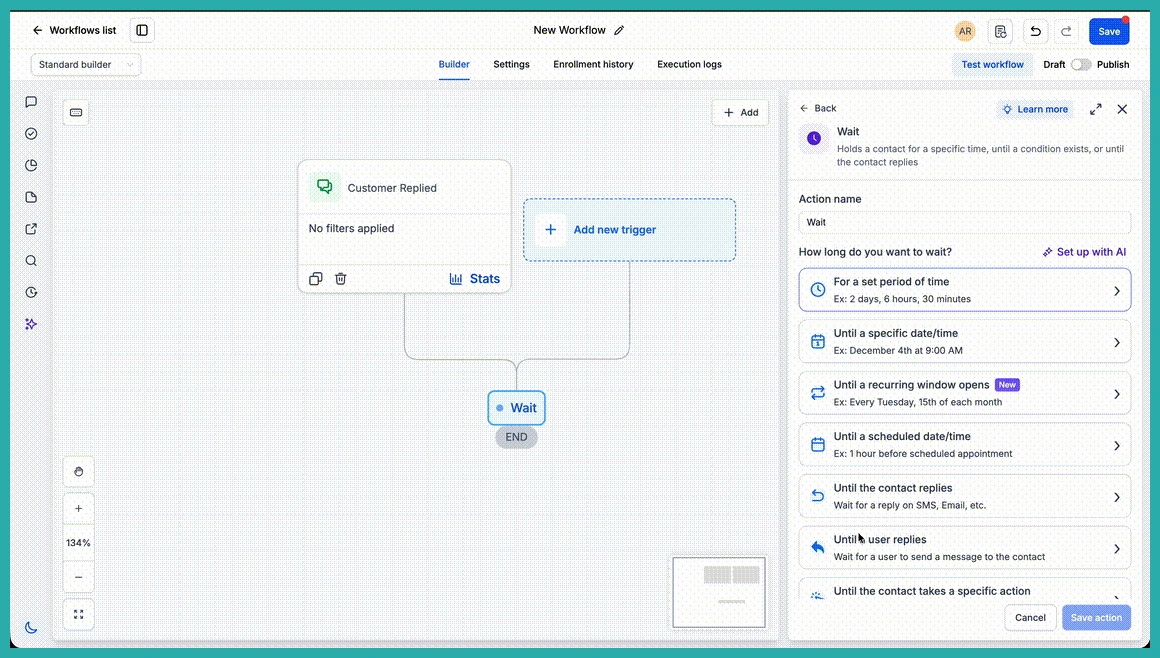
In the screenshot below, you'll see the Wait action with User Replied selected and the timeout field ready to fill in.
A couple of ways to use it
For support: wait up to 30 minutes for a reply. If an agent answers, the workflow continues as normal. If not, it alerts a supervisor and reassigns the conversation.
For sales: wait 15 minutes for a rep to respond to a new lead. If nobody does, create an urgent task and notify the manager before the lead goes cold.
This is the kind of thing you'd otherwise be checking manually a dozen times a day. Set it once and let it keep an eye on response times for you. Go build one for your busiest inbox and see how it feels to stop watching the clock.
