
Stop Missing Calls From Hidden Numbers
Every missed call is a missed lead. And if you've been automatically blocking calls from private or anonymous numbers, you may have been turning away real people who simply choose not to display their number.
That changes now.
What's Changed
ESC Hub now lets you receive incoming calls even when the caller's number is hidden. Instead of those calls being blocked or dropped, they come through - and the system handles them in a controlled, organised way.
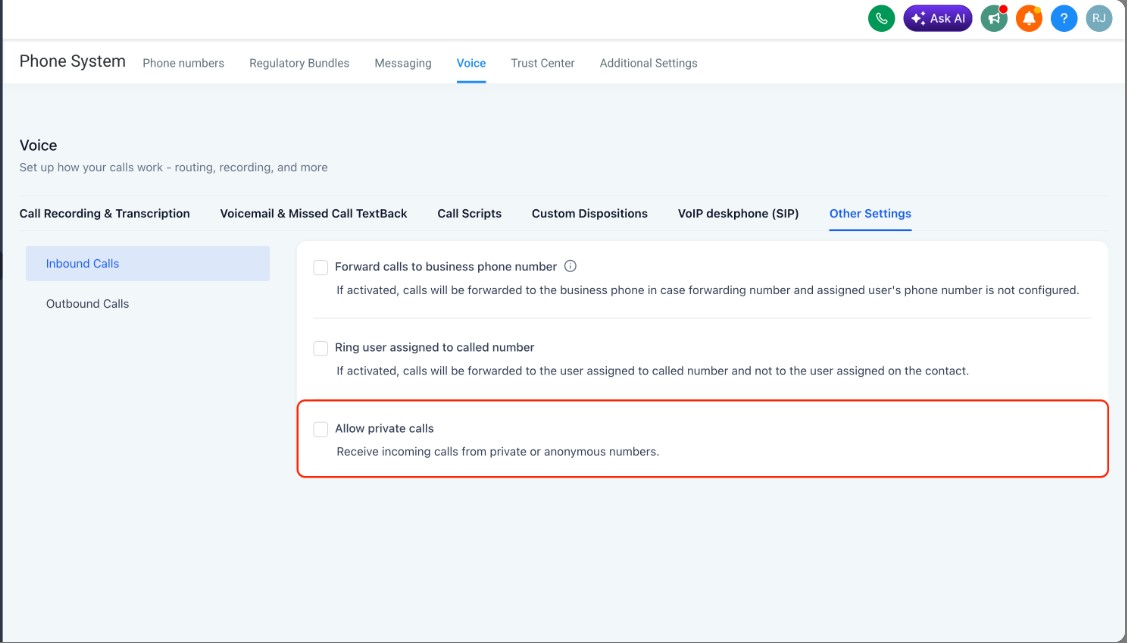
You can switch this on in your sub-account settings: go to Phone System > Voice > Other settings > Inbound calls > Allow private calls.

How Private Callers Are Saved
When a private caller comes through, ESC Hub automatically saves them as a new contact using the format "Private caller from [country code] at [timestamp]." They're also tagged "private phone number" so you can find and filter them easily in your CRM.
No guesswork. No lost conversations. Just a clean record of who called and when.
Why It Matters
Some leads are cautious. Some people just have private numbers by default. Either way, they're still potential clients - and now you won't lose them before the conversation even starts.
Ready to switch it on? Log into your ESC Hub account and head to your phone settings to enable it today.
