
See every recording on a call from your phone, not just the first
You pull up a call on your phone to check what was said. You listen back, and the important bit is missing. Maybe the call got transferred, or there were a few legs to it, and your mobile app only ever showed you the first recording.
That gap is now closed.
What landed
The mobile app now shows every recording on a call, not just the first one. Each recording plays on its own and carries its own transcript. So if a call was transferred or had more than one leg, you can finally hear and read the part that actually mattered.
Single-recording calls look exactly the same as before, so nothing changes there. This only adds more where there's more to show.
How to use it
You can find these from a few places, whichever you're already in:
- Open Recents,
- or a contact's Call Details,
- or a call inside Conversations.
Find a call that has more than one recording. You'll spot little labels like 1/2 and 2/2 showing you which recording is which. Play each one, and read its transcript over in Conversations.
In the screenshot below, you'll see a call with its recordings laid out, each ready to play separately.
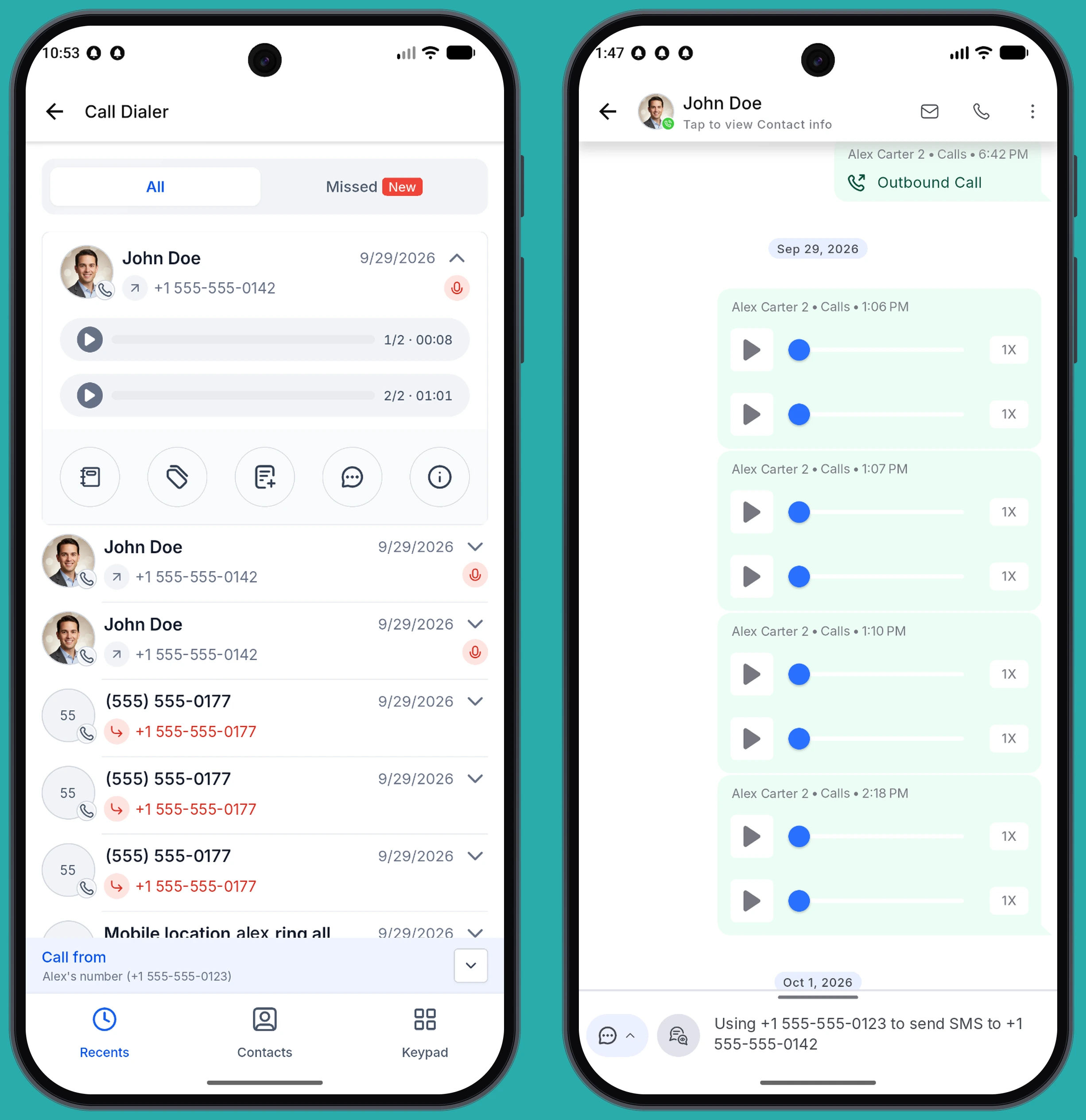
One honest note: a transcript only shows up when the system has one ready for that particular recording. If a transcript isn't there yet, the recording itself still plays.
This one's already live on iOS and Android - next time a call looks like it's missing something, go check for that 1/2, 2/2 label and you'll likely find the rest is right there.
