
Undo Any AI Change in Your Workflows with One-Click Version Restore
You ask the AI Assistant to tweak a workflow, it makes the change, and then you realise it removed a trigger you needed. Until now, that meant rebuilding by hand.
That risk is gone. The AI Builder now keeps a card for every build and edit it makes, and any of them can be restored in a single click.
What you get
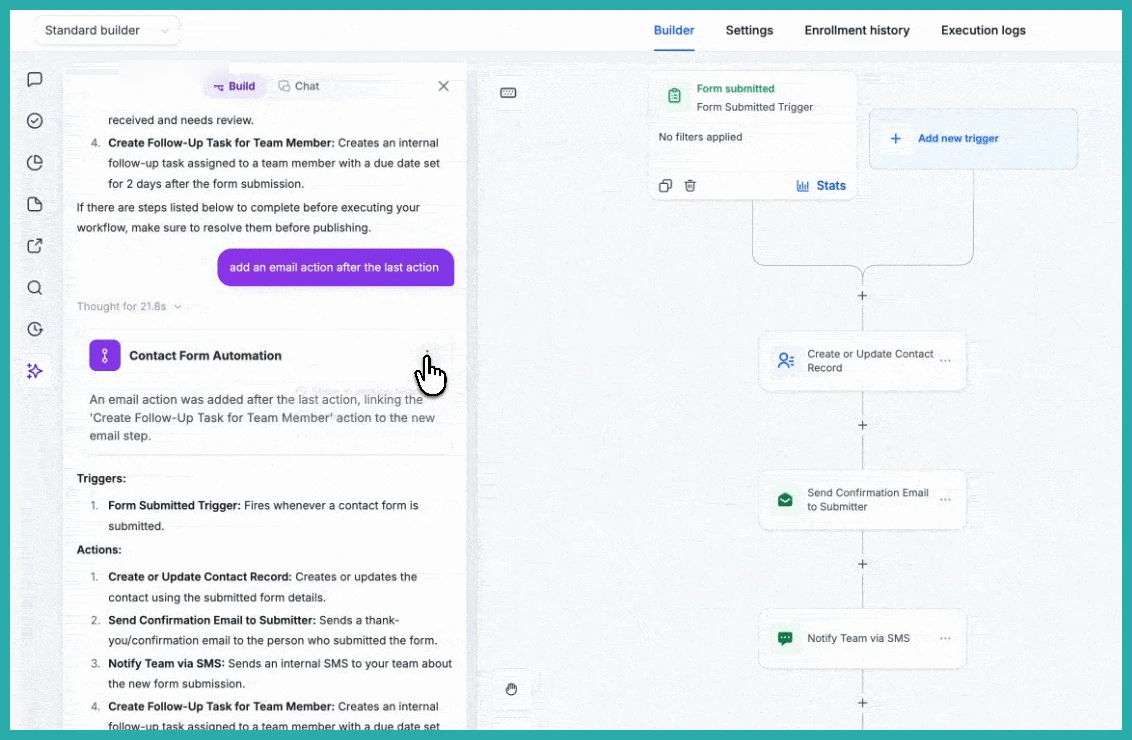
Every time the AI Assistant builds or edits your workflow, it drops a card right there in the chat, at the exact point the change happened.
The card that matches what's on your canvas carries a purple border, so you can always see which version is live. Prompt another change and the new card takes the border, while the older one gains a restore option in its menu.
Restoring is non-destructive. Roll back to an earlier version and your newer ones stay right where they are, still ready to restore. You can move between iterations freely and nothing gets thrown away.
How to use it
- Prompt the AI Assistant to build or edit your workflow.
- An artifact card appears in the chat with a purple border, marking it as the current version.
- Prompt another change. The new card takes the border, and the previous card now shows "Restore this version" in its three-dot menu.
- Open the three-dot menu on any older card and choose "Restore this version." The canvas reverts instantly.
In the screenshot below, you'll see the cards stacked in the chat, with the active version outlined in purple and the menu that lets you restore an earlier one.
A couple of handy notes. If auto-save is off for your account, cards show an "Unsaved" pill until you save the workflow yourself. And if you want the full picture, choose "Show in version history" from any card. That opens the Version History tab, where your AI edits and your manual changes sit together in one timeline. Version History stays the single source of truth for version numbering.
This makes the AI Assistant safe to play with. Try a bold edit, compare it, and roll it back if it's not right, all without leaving the conversation or losing a scrap of work. Go make that change you've been hesitant to try.
