
Set Up Your Conversations Layout to Match How You Work
If you spend a lot of time in Conversations, you've probably wished you could give one panel a bit more room. Maybe the message thread feels cramped, or the contact details are squeezed too narrow to read at a glance.
Now you can set it up exactly how you like.
What you get
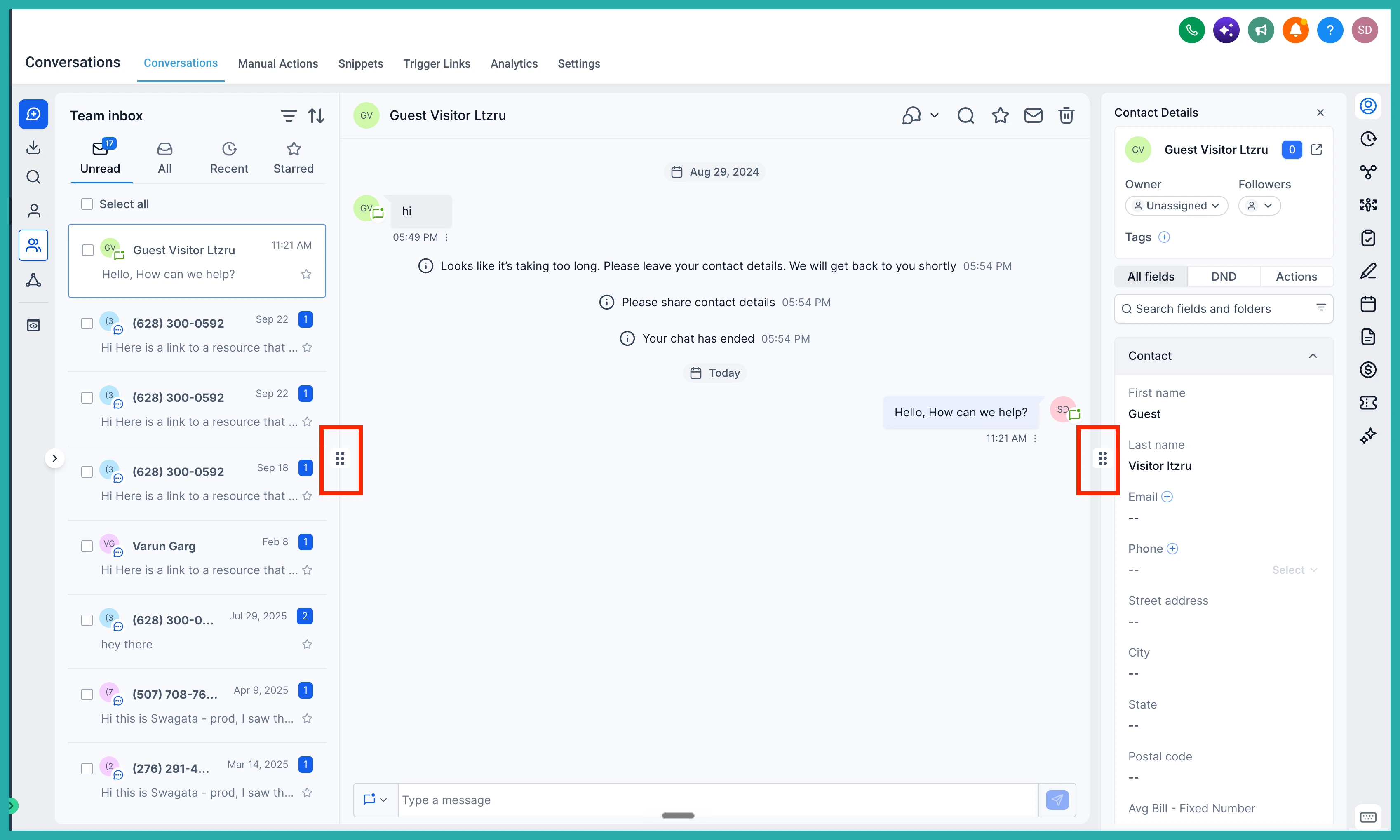
Conversations has three panels side by side: your conversation list, the message thread in the middle, and the contact details on the right. You can now drag the divider between any of them to make it wider or narrower.
Want more space to read a long email thread? Pull the middle panel wider. Need the contact details open so you can see everything about a person while you reply? Give that side more room instead.
Best of all, your sizes are saved. Set it once and it stays that way the next time you open Conversations, so you're not fiddling with it every visit.
How to use it
- Go to Conversations.
- Hover over the divider between two panels and look for the resize handle.
- Click and drag it left or right until the panels are the width you want.
In the screenshot below, you'll see the divider you drag to adjust each panel's width.
Each panel has a minimum and maximum width built in, so you can't accidentally squash one down to nothing. The layout always stays readable.
It's a small change, but it's one of those things you feel every day once it fits the way you work. Go in and nudge the panels to suit you - it takes about ten seconds and it's yours from then on.
