
Reply to Your Threads Comments Straight From Social Planner
If you post on Threads, keeping up with the replies used to mean opening yet another app and hoping you'd catch them all. Now you don't have to.
Threads comments have joined your unified inbox in Social Planner. You can read them and reply to them right where you manage everything else.
What you get
Threads now sits alongside the platforms you're already managing in one place - Facebook, Instagram, LinkedIn, TikTok, Communities and Bluesky. One inbox, all your conversations.
When you reply, you're not limited to plain text either. You can respond with:
- Text
- Images
- Emojis
- Location attachments
Comments sync in near real time, so what you see is what's actually happening on Threads. No refreshing, no wondering if you've missed one.
How to use it
Here's the whole flow:
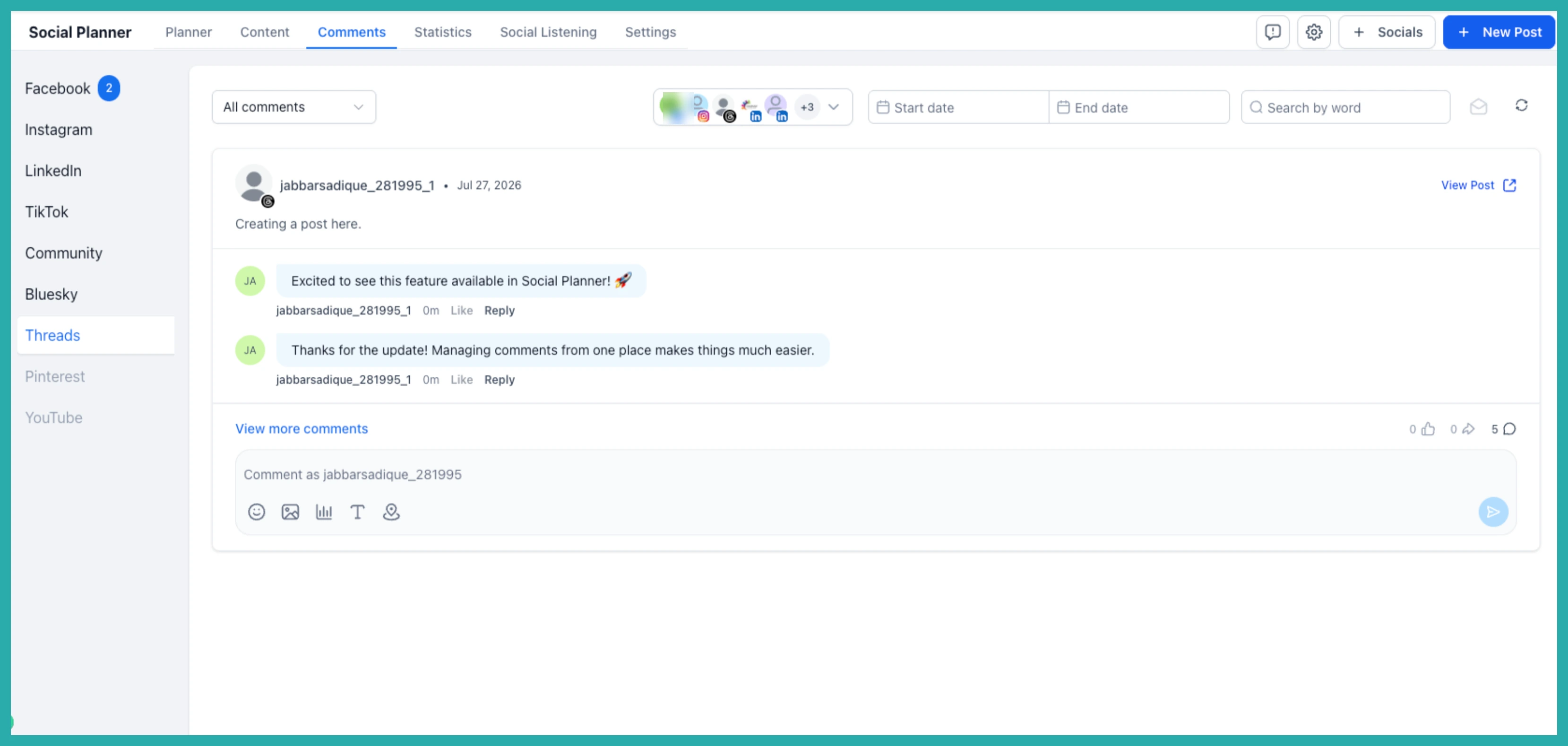
- Go to Marketing, then Social Planner, then Comment Management.
- Select your Threads account.
- Open the Comments tab.
- Read and reply to your comments right there in the unified inbox.
In the screenshot below, you'll see the Comment Management view with your Threads comments ready to answer, just like the rest of your channels.
One thing to do first
If you already had Threads connected, you'll need to reconnect it once. That gives the system the extra permissions it needs to pull in your comments. It only takes a moment, and then you're set.
That's it. One less app to open, and one more place your conversations come to you instead of the other way round.
