
New WhatsApp Features and UI Improvements!
Businesses now have access to a powerful new tool to enhance their WhatsApp communication: the WhatsApp Schedule Send feature. This new functionality allows users to schedule both template and freeform WhatsApp messages for future delivery, ensuring timely communication with customers. Here’s a step-by-step breakdown of the feature and additional updates.
How to Use WhatsApp Schedule Send
The WhatsApp Schedule Send feature provides flexibility for businesses to plan their communications in advance. Here’s how it works:
Compose Your Message:
Whether you’re using a template message or writing a freeform message, start by creating the content you want to send.
Set the Date, Time, and Time Zone:
Once the message is ready, select the Send and Schedule option.
A pop-up will appear, allowing you to choose the specific date, time, and time zone for message delivery.

Confirm and Schedule:
After entering the schedule details, confirm the settings to finalize the scheduled send.
This feature is designed to provide flexibility, allowing businesses to ensure that messages are sent at the most strategic and appropriate times.
Template and Freeform Message Scheduling
Template Messages: These are predefined message formats that businesses can use for common communication scenarios. You can now schedule these templates to be sent at a later time, aligning with your business needs.
Freeform Messages: In addition to templates, you can schedule custom, freeform messages for more personalized communication.
Phone Numbers Tab UI Update
In addition to the WhatsApp Schedule Send feature, the phone numbers tab has received a user interface (UI) upgrade. The redesigned layout improves the user experience by making it easier to manage your phone numbers and message limits.
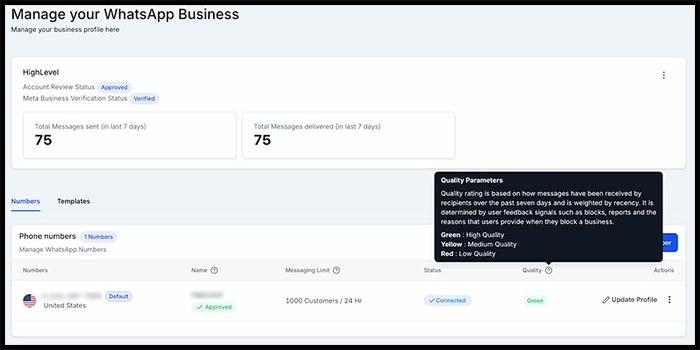
Key UI Improvements:
Message Limits: View how many customers can be messaged within a 24-hour period.
Tooltips: New tooltips provide helpful information and insights, making it simpler to navigate and understand the phone numbers tab.
These updates not only streamline messaging workflows but also improve overall usability, giving businesses more control over their communication strategies.
