
See All Your Automation Errors in One Place with Workflow Maps
Coming Soon: Workflow Maps isn't in your ESC Hub account yet. We'll let you know as soon as it arrives.
You build an automation, it runs, and you move on. That's the whole point - it works in the background so you don't have to think about it.
Until one step fails. A webhook doesn't fire, an integration drops, and a lead sits there with no follow-up. The problem? You usually had no easy way to spot it. You'd be clicking through workflows one by one, hoping to catch where things went wrong.
That's what this upcoming update will fix.
What you get
Workflow Maps will show you every workflow error across your account in one place. Instead of checking each automation separately, you'll see at a glance which ones need attention, open the failed run, and go straight to the step that broke.
A failed automation can interrupt your lead follow-up or a customer's sequence without you noticing for days. Soon you'll spot it, understand what failed, and know exactly where to fix it.
How it works
Once it arrives, go to Automation, then Workflows, then Workflow Maps.
In the screenshot below, you'll see an errors badge on any workflow that failed during recent runs. That badge is your signal that something needs a look.
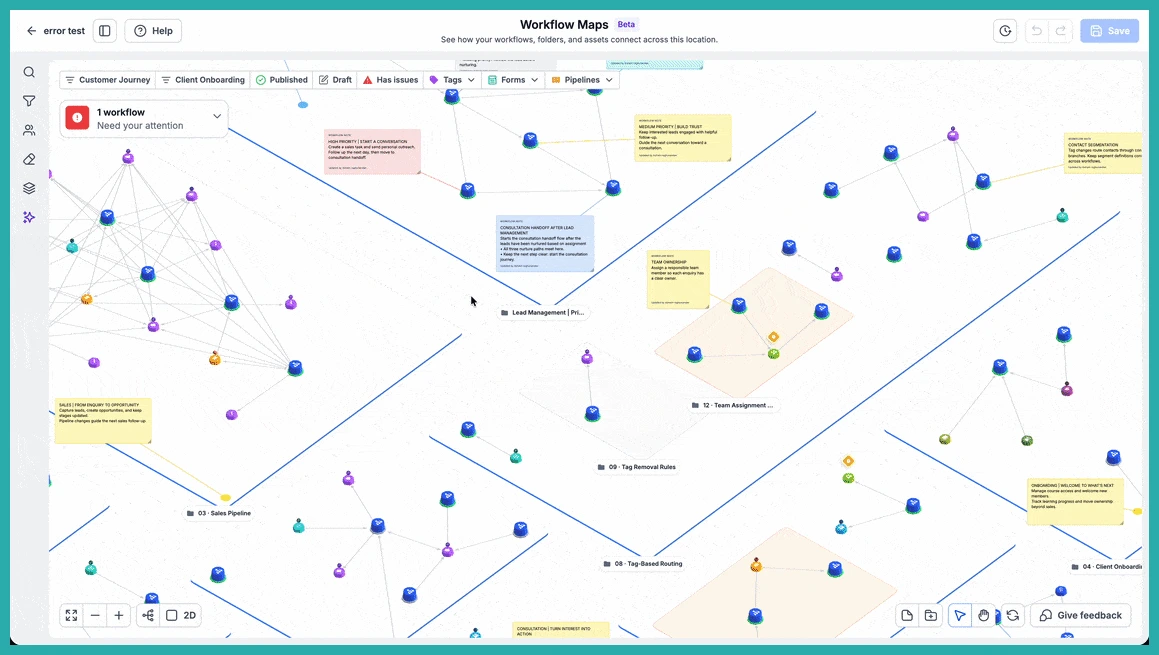
From here, walk through it step by step:
- Select Review Workflows With Errors to see everything flagged, grouped into Published and Draft.
- Use the Has issues filter to narrow the map down to just the workflows that need you.
- Pick a workflow to see its failed executions, the affected step, and the error details.
- Open the workflow in the builder to correct that step.
- Come back to the map and select Mark as Read once you've handled it.
A few honest notes
Mark as Read will clear the error badge, but it won't repair the workflow or retry the failed run for you. You'll still make the actual fix in the builder. The map just tells you where to look and keeps your list tidy once you're done.
If you've got an automation that's been misbehaving, this will be the fastest way to find out why. Once it arrives, take a look at your map and see what's been flagged.
