
Chat Widget Now Lets You Handle Legal Notices and Consent Separately
If you use the chat widget on your site, you've probably run into that one all-in-one compliance setting that tried to do everything at once. A legal notice and a marketing consent tick-box are two different things, but the old setup lumped them together.
That's been sorted. You now have a proper Compliance notice & consent section, and you can set each part up on its own.
What you can do now
Two separate jobs, handled separately:
- Show a legal notice below your contact form, with no action needed from the visitor. It's just there for them to read.
- Add a consent checkbox with your own wording - handy for explicit opt-ins like SMS or email marketing.
From there you can fine-tune it:
- Make consent required or optional, depending on what your business needs.
- Pre-check the box when the form loads, if that suits you.
- Show a clear prompt when a required box is left unticked, with a "Please tick this box to continue." message.
- Keep a record. Consent is tracked in the Activity details, including whether it was given, whether it was required, and the exact wording the visitor saw.
That last part is the quietest win of the lot - you always have a clear record of what each lead actually agreed to.
How to set it up
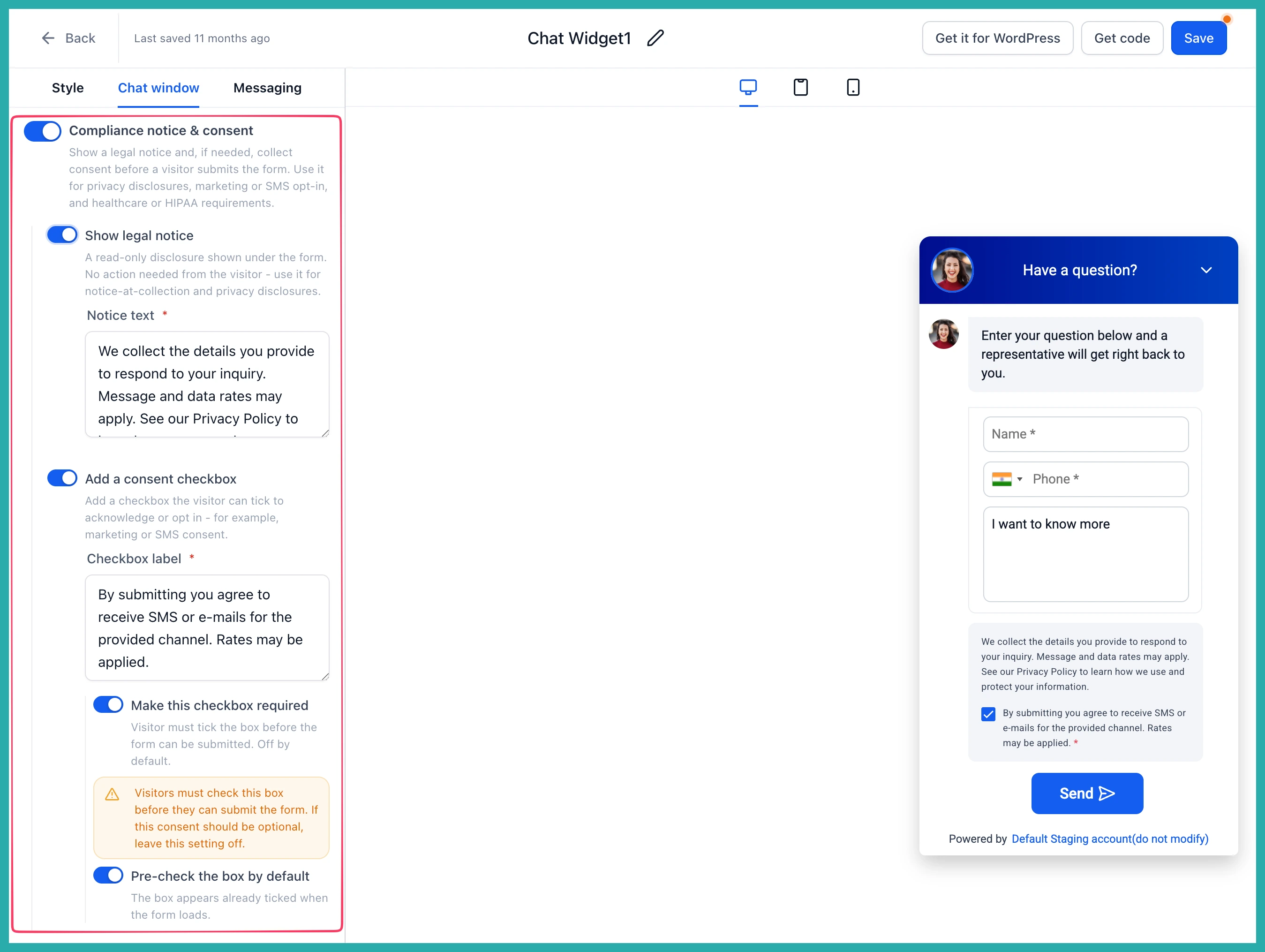
Open your Chat Widget, go to the Chat window, then Additional options, and you'll find Compliance notice & consent.
From here you configure your legal notice, your consent checkbox, whether it's required or optional, and whether it starts pre-checked. In the screenshot below, you'll see the live preview updating as you go, so you can see exactly what a visitor will see.
A few things worth knowing
This is available to everyone. Your existing widgets stay exactly as they are until you open and save them in the builder, and when you do, your existing legal text is carried over into the right field automatically. Widgets set up through A2P registration keep their current settings, and nothing changes with your website embed code.
Any new widget you create will default to legal notice on, consent checkbox on, and required consent off - a sensible starting point you can adjust.
If getting consent right has ever felt fiddly, this makes it a lot clearer. Have a look at your chat widget when you get a spare few minutes and set it up the way your business actually needs.
