
Link Related Records Automatically Inside Your Workflows
A quick heads-up: this one's in Labs
It's an early feature you turn on yourself in Settings > Labs inside your account. It works, but it's still in development - the documentation and support is limited and not everything will behave perfectly yet.
If you like getting your hands on new things early, switch it on and have a play. If you'd rather wait for the finished, fully-supported version, leave it off and we'll let you know when it lands.
Connecting related records used to be a manual job. A new contact comes in, and you go hunting for the company, the opportunity, or the custom record they belong with, and link them yourself, one at a time.
There's now a workflow action that does that matching and linking for you, based on the field values you already have.
What it does
The new Associate Records action finds records that match rules you set, then links them to the record moving through your workflow. It works across Contacts, Companies, Opportunities and Custom Objects, depending on your workflow type and the associations set up in your account.
In one action you can:
- Find records using one or more field-based filters
- Use merge fields from the enrolled record as your filter values
- Link the earliest created match, the latest created, or all matches
- Apply an existing association label
- Create links between different objects
How to set it up
Open a Contact, Company or Custom Object workflow and add the Associate Records action. Then work through the settings.
- Choose the object that holds the records you want to link.
- Add filters to pin down the matching records. When you add more than one filter, a record has to meet every condition to qualify.
- Decide how multiple matches are handled - earliest, latest, or all of them.
- Pick an association label if one's needed.
- Save and publish the workflow.
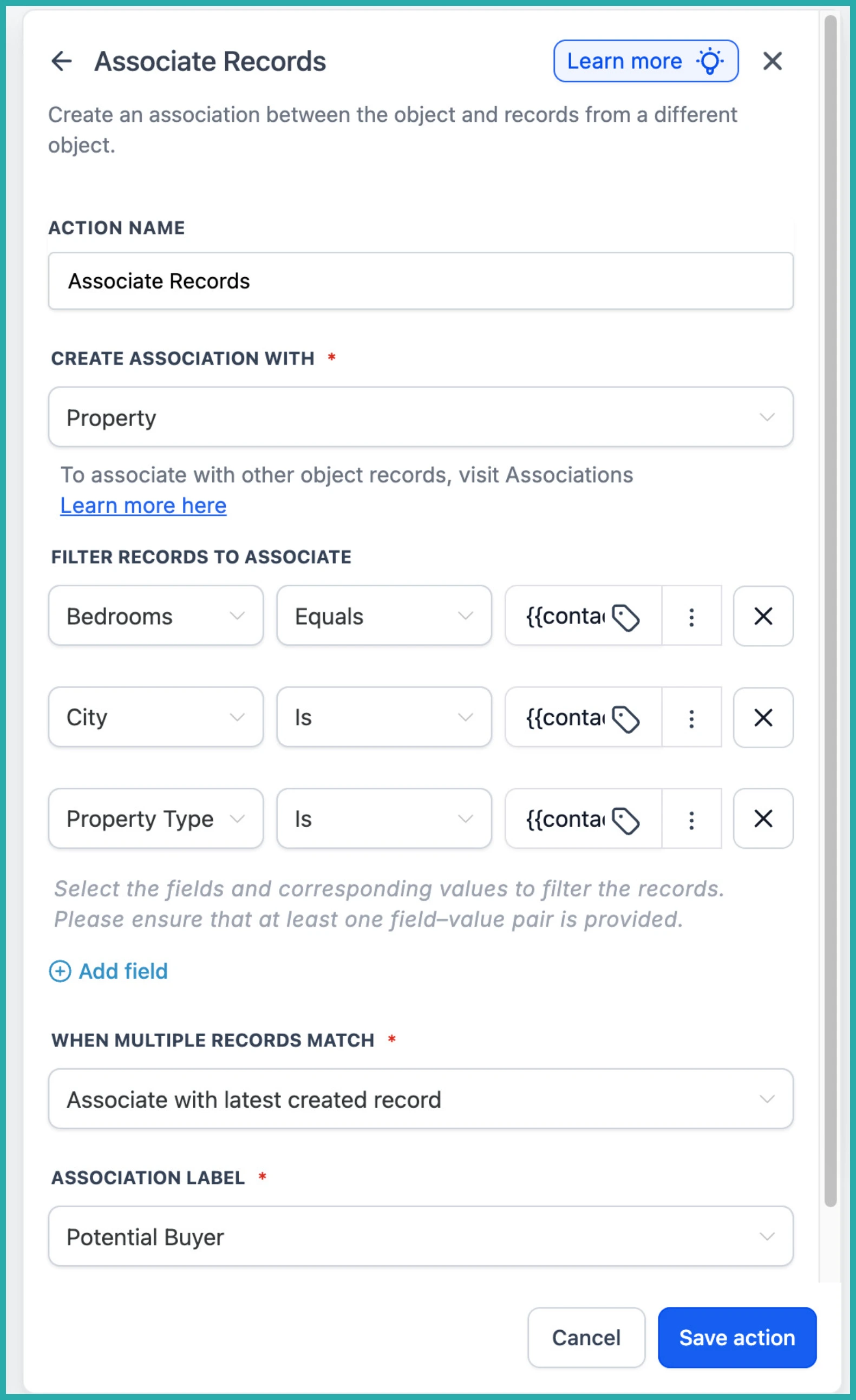
In the screenshot below, you'll see the action with its field-based filters and the option to apply an association label.
A quick example
Say you run a property business. When a buyer comes in, you can automatically link them to every Property record that matches their preferred city, property type and number of bedrooms. No searching, no manual linking - the workflow does it the moment they're enrolled.
The same idea works anywhere you keep related records together, standard or custom.
Once your associations are building themselves, you can start creating workflows that act across those linked records too. Have a play and see how much manual tidying it takes off your plate.
