
Check Your Emails for Spam Risks Before You Hit Send
You write a good email, line up your list, hit send - and then wonder where it actually ended up. The inbox, or the spam folder nobody checks?
Now you can find out before you send, not after.
What landed
Email campaigns have a new Pre-Send Spam Check built right into the send screen. It looks over your email, flags anything that could trip a spam filter, and tells you exactly what to change. No external tools, no guessing.
The results come back in three tabs:
- Content - scans your subject line and body for spam-like phrases, scare tactics, over-the-top urgency, dodgy guarantees and unsubscribe wording. It shows you the exact phrase to tweak.
- Sender setup - checks your sender name, domain and email, and nudges you toward a verified sending domain that lines up properly.
- Trust & reputation - spots links and other bits that make mailbox providers trust your email less.
Each recommendation shows what it found, a risk level of High or Medium, and the suggested fix. Sort out the High risk items first, then run the check again to confirm they're cleared.
How to use it
- Go to Marketing, then Emails, then Campaigns, and open or create a campaign.
- Build your email in the usual way.
- Click Send or schedule in the top-right corner.
- Fill in your sender name, sender domain, sender email and subject line.
- Scroll to the bottom of the send screen and click Check now on the spam check banner.
In the screenshot below, you'll see the banner where the check lives, waiting at the bottom of the send screen.
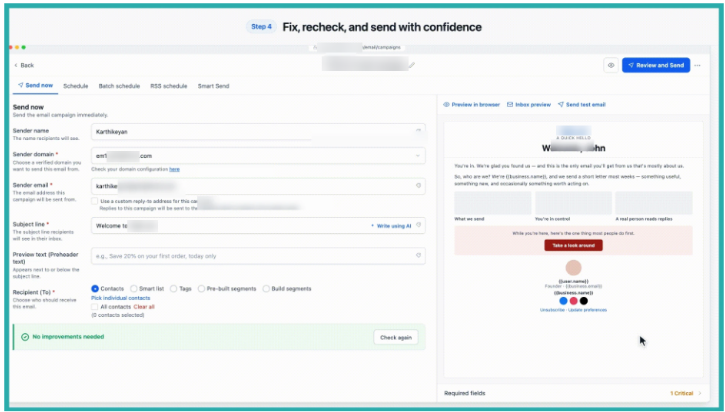
Review what it finds, make your changes, and click Check again to see it come back clean.
A couple of honest notes
Running the check never sends your email, and the recommendations don't block you from sending. You stay in control.
A clean result clears the most common spam risks, but it can't promise inbox placement on its own. Mailbox providers also look at how people engage with your emails and how healthy your list is. Still, this takes the biggest, most fixable risks off the table before anything goes out.
Next time you're about to send, give it thirty seconds. It's a small step that can make a real difference to whether your email actually gets read.
