
Retry or reschedule a failed social post in one click
You schedule a week of social posts, feel organised for once, and move on. Then one of them fails to publish. A connection hiccup, an expired login, who knows.
You usually find out later. And the old fix was the worst part - rebuild the whole post from scratch, or clone it and hope.
Not anymore.
What you get
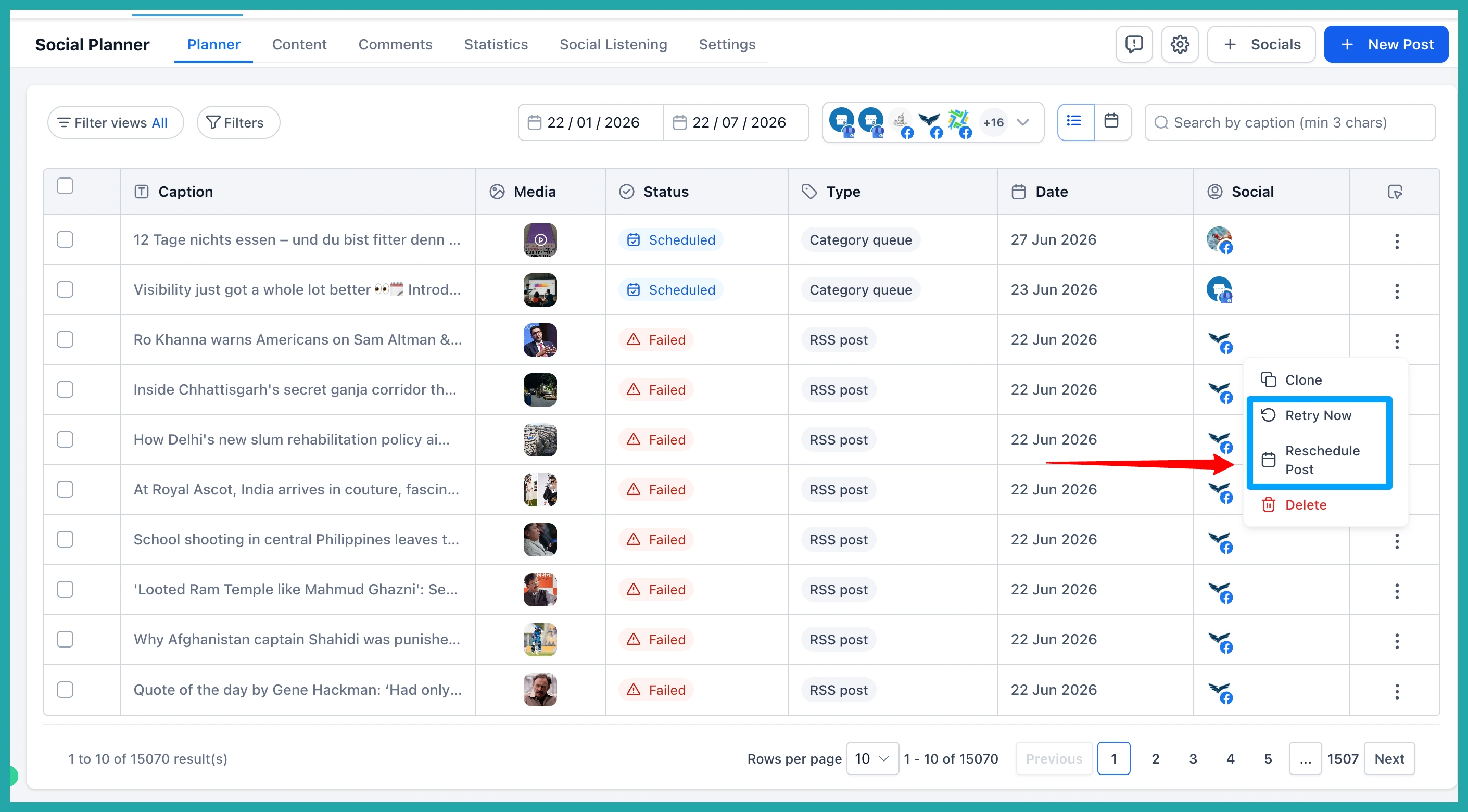
Failed posts now have their own recovery options, right in the post menu.
Hit Retry Now and the post publishes again using everything you already set - same content, same settings, same connected accounts. If it works, it moves straight to Published.
Or pick Reschedule, choose a new date and time, and it slides back into your schedule to go out then.
No cloning. No rebuilding. The post you already wrote, given another go.
A failed post isn't a big deal until you have to redo it. Then it's ten minutes you didn't have, for something you'd already done once.
This just removes that. One click and you're sorted, whether you run a couple of accounts or a couple of dozen.
How to turn it on
Go to Marketing, then Social Planner, and open your Failed Posts. Click the three-dot menu on the one that didn't go out, and choose Retry Now or Reschedule. That's it.
One honest note: it's one post at a time for now, no bulk retry yet. Got a post sitting in Failed right now? Go give it another shot - it'll take you about thirty seconds.
