
Your Dashboard Trend Arrows Can Now Show Green for the Right Reason
You glance at your dashboard, see a green arrow, and think all is well. But if that green arrow is sitting on your unsubscribe rate, it's telling you the opposite of the truth.
Until now, every widget assumed higher was better. A rising unsubscribe rate, a climbing bounce rate, a growing cost per lead - all of them turned green as if going up was good news.
That's now yours to set.
What you get
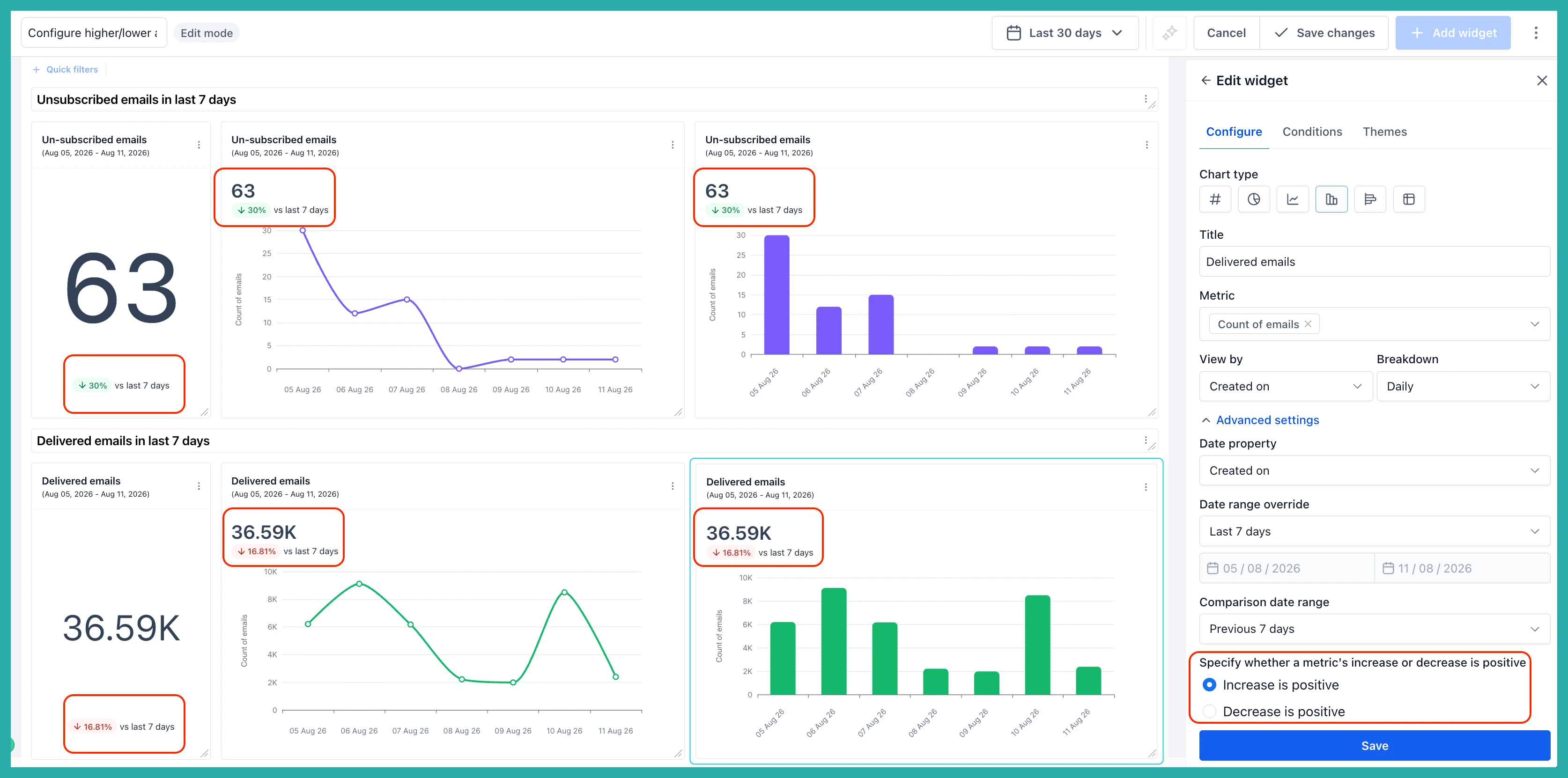
Every widget that shows a number stat has a trend badge - the little arrow with the percentage change next to it. You can now tell that badge whether an increase or a decrease should be treated as the good result.
So a falling unsubscribe rate shows green, because down is good. A falling delivered-email count still shows red, because down is a problem. The colour finally matches what the number actually means.
It works the same whether the widget is set to Number, Line, or Bar. The trend badge shows up consistently across all of them, as long as you've set a comparison date range.
How to set it
Open the dashboard or custom report and find the widget you want to fix.
- Open the widget's Configure panel.
- Go to Advanced settings and set your Date range override and Comparison date range. The trend badge needs a comparison to work.
- Choose whether the metric's increase or decrease is positive. You'll see Increase is positive (the default) or Decrease is positive. Pick the one that matches how the metric should be read.
- Save your changes. The badge colour updates on its own, across every chart type for that widget.
In the screenshot below, you'll see where that setting lives in the Configure panel.
This is especially handy for the metrics where lower is the win - churn, bounce rate, cost per lead, unsubscribes. And if you're sharing a dashboard with clients, green now always means good, which saves you a lot of explaining.
One note: existing widgets stay on "Increase is positive" until you change them, so nothing shifts colour on you overnight. Go update the couple of widgets where down is actually the good news - it takes about a minute each.
