
Suggest Extras at Checkout: Choose the Add-Ons Your Restaurant Guests See
A guest fills their cart, heads to checkout, and that's that. But what if they'd have happily added a dessert, a drink or a side, if you'd only put it in front of them?
That's what this does. Right before checkout, your restaurant guests now see a short list of extras, and you decide exactly what's on it.
What you get
A suggestion list that shows at the perfect moment, with the details under your control:
- Your own heading: write the line guests see, like "Something sweet to finish?"
- How many to show: anywhere from 1 to 8 items.
- Choose myself or Pick for me: add specific dishes or whole categories, or let the system fill the list from your menu.
- One-tap add: guests tap the + and the item drops straight into their order.
- No repeats: anything already in the cart is skipped, so you're not suggesting what they've already picked.
- Live preview: see how the list looks on desktop, tablet and phone before you save.
It's a simple nudge at the moment it counts, and it's your menu doing the suggesting, not a generic prompt.
How to set it up
Open your Restaurant Website, go to Restaurant pages, then Cart drawer, and open Anything else?
- Turn on Suggest items before checkout.
- Add your heading.
- Choose how many items to show.
- Pick Choose myself to hand-select dishes or categories, or Pick for me to let the system fill it in.
- Check the preview, then click Save.
In the screenshot below, you'll see the settings panel alongside the live preview, so you can get the wording and the look right before it goes out to guests.
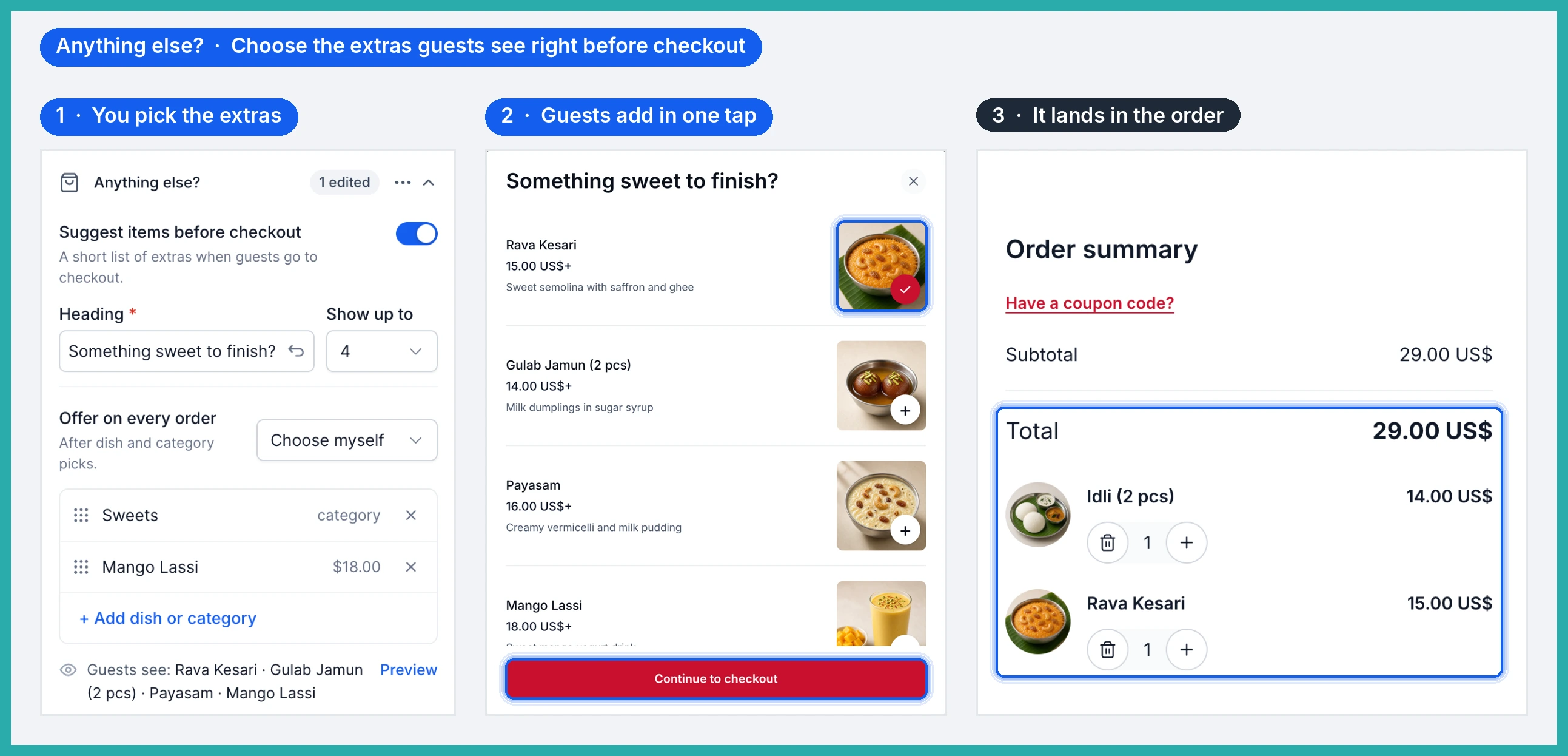
Use it to feature a new special, push your best dessert, or just make sure a drink gets offered with every meal. Your menu, your call.
One note on availability: this is for accounts using Restaurants on the Founder's plan. If that's you, it's worth a few minutes to set up. One more tap from your guest, one more treat in the order.
