
Coming soon: See Exactly How Your Emails Will Look in Gmail, Outlook and Apple Mail Before You Send
Coming soon
This one isn't available in your account just yet. We're sharing it now so you know what's on the way, and we'll let you know as soon as you can use it.
You build an email, it looks great on your screen, you send it. Then it lands in someone's Outlook looking nothing like you intended, or Gmail chops the bottom off.
Inbox Preview lets you see how your email actually renders in real email clients before anyone receives it.
What you get
Instead of the usual simulated desktop, tablet and mobile views, this shows you the real thing - your email captured from Gmail, Outlook, Apple Mail and more, exactly as a recipient would see it.
You can preview as a specific contact, so you see your email with their personalised details filled in rather than placeholder text.
Pick the clients you want to test, or start with the popular ones already chosen for you. You can filter by device and by light or dark mode, and pin the clients you check most so they're selected every time. Open any preview full size to inspect it properly and move between clients side by side.
It also flags the common troublemakers: Outlook rendering quirks, dark-mode inconsistencies, and Gmail clipping. You'll see your email's estimated size with a warning if Gmail is going to cut it off. And if you go back and edit, it tells you which previews are now out of date so you're never reviewing an old version.
How to use it
- Open an email in the email builder or the AI editor.
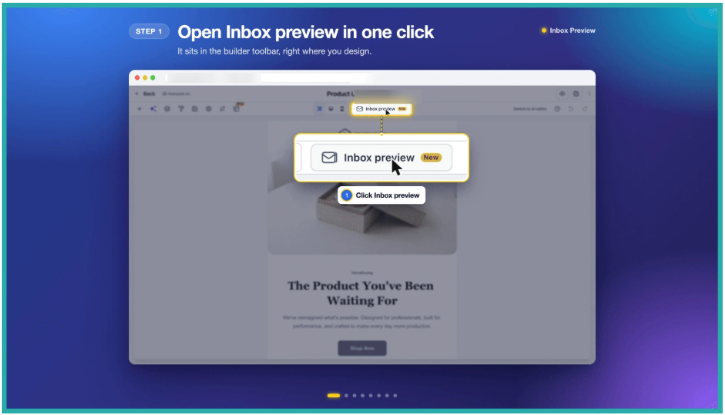
- Click Inbox preview in the toolbar, or open it from Preview & test.
- Select the email clients you want to check.
- Click Preview email, then review each client's preview as it comes in.
In the screenshot below, you'll see the previews lined up so you can compare layouts and spot anything that looks off across different clients.
One thing worth knowing: each account has a set number of inbox previews. Failed previews don't count against that, so if one doesn't come through you can simply retry.
Next time you've got an important email ready to go, give it a quick run through the real inboxes first. A couple of minutes now saves that sinking feeling later.
