
New Setting for Personal Calendar Creation
How It Works
ESC Hub now gives you more control over how personal calendars are created when new users are added.
Previously, whenever a new user was added to an account, the system automatically created a personal calendar for them. While this worked well for simple setups, many teams and agencies needed more flexibility, especially when using structured calendar setups or shared calendars.
With this update, you can now control whether personal calendars are created automatically or not.
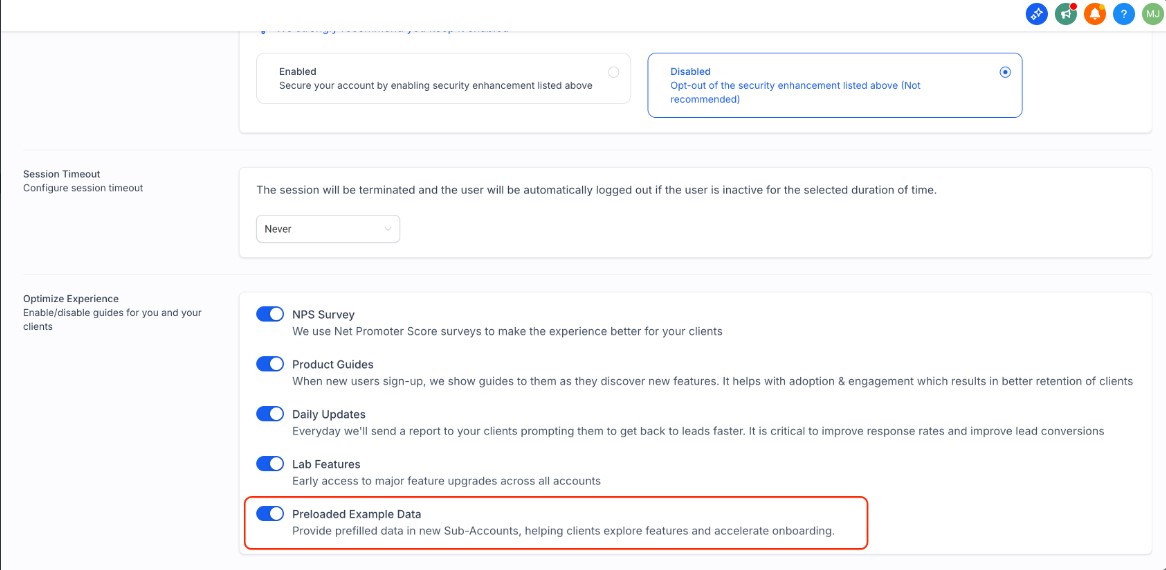
This behavior is controlled by the Preloaded Example Data setting at the agency level. When enabled, personal calendars will continue to be created automatically. When disabled, new users will no longer receive an automatically generated personal calendar.
How to Use It
To manage how personal calendars are created:
Go to Agency View
Open Settings
Navigate to Company
Select the Advanced Settings tab
Toggle Preloaded Example Data ON or OFF depending on your preference
When this setting is turned off, personal calendars will not be automatically created when new users are added.
Existing calendars remain unchanged, and manual calendar creation is still fully supported.
Why This Matters
Not every team needs a personal calendar for every user.
This new setting allows you to keep your calendar structure clean and intentional by deciding exactly when calendars should be created.
Benefits include:
• Better control over user setup and onboarding
• Cleaner calendar environments for structured teams
• Support for snapshot-based setups and shared calendars
• Reduced unnecessary calendar creation
Instead of every user automatically receiving a calendar, you can now configure the behavior that best fits your system.
