
Managing Large Batches of Media Files Just Got a Lot Easier
If you store a lot of images, videos, or other media in ESC Hub, moving large batches of files in and out of the Media Center just became much less time-consuming. A new folder upload and download feature means you can now work with entire folders at once - without losing your original file structure.
What's changed
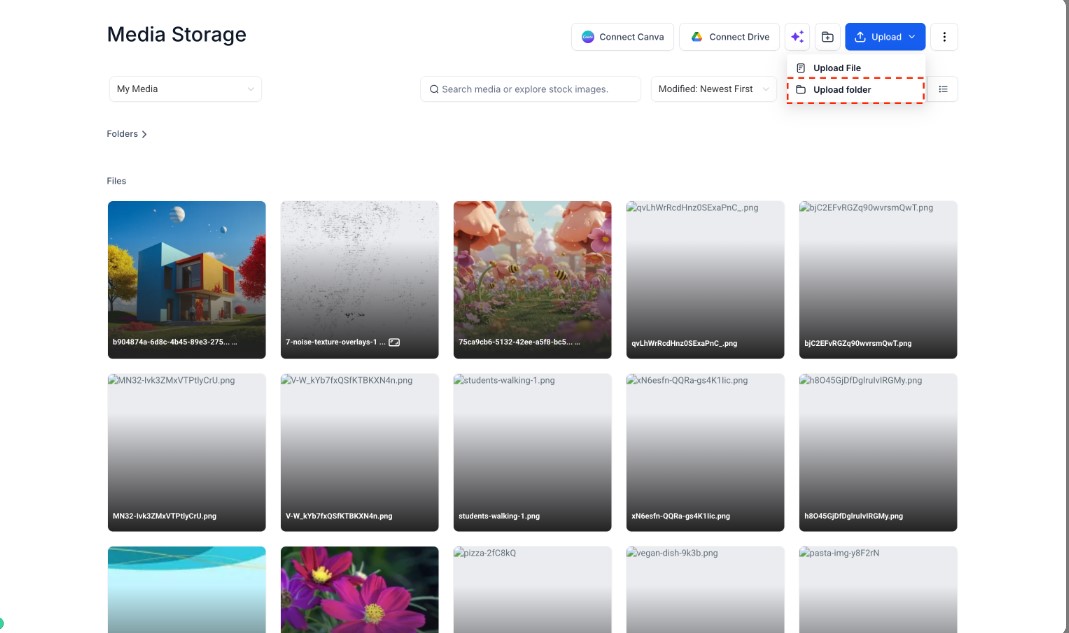
A new Upload Folder option now appears in the Media Center header alongside Upload File
You can upload entire folders including subfolders and files in one go
Drag and drop now supports folders, multiple folders, and mixed uploads with both folders and individual files
Folders can be downloaded as a single zip file, with the original folder structure preserved
Upload progress now shows a clearer folder-based view, including nested files and subfolders
Improved sorting so the order you choose in the main grid carries through to the Move to Folder modal
Improved upload and download performance for larger file batches
Clearer handling for upload limits, skipped files, and partial completion states
How to access it
Open the Media Center. From the header you'll now see Upload Folder next to Upload File. You can also drag and drop folders directly into the Media Center. To download a folder, use the Download option on any folder to save it as a zip file.
Why it matters
Reorganising your media library or migrating files used to mean uploading everything one by one and rebuilding your folder structure manually. Now you can move large batches in and out quickly, with your organisation intact from the start.
