
Recurring Appointment Notifications Just Got Clearer and More Consistent
If you book clients into a recurring slot - weekly coaching, a monthly check-in, a standing session - you'll know the old notification setup could get noisy. Every single occurrence triggered its own confirmation, and anything you set up as a custom recurrence didn't send notifications at all.
That's all been sorted. Your recurring appointments now communicate cleanly, consistently, and in a way your clients can actually follow.
What landed
A few things improved at once, and none of them need setting up. They're live automatically, applying to any newly booked or edited appointment.
One confirmation for the whole series
For default recurring appointments, the confirmation (or unconfirmed) notification now goes out once per booking and covers the entire series. Before, your client got one for every occurrence, which meant a wall of emails for a single standing booking.
Now it's one clear message, start to finish.
Custom recurring appointments are finally covered
If you created a custom recurrence in your account, those bookings used to send no notifications whatsoever. That gap is closed.
Custom recurring appointments now send a confirmation once per booking, covering the whole series - exactly like the default ones.
Reminders and follow-ups for every occurrence
The confirmation is one message for the series, but reminders and follow-ups still fire for each individual occurrence, so every session stays on your client's radar as it approaches. These now work for custom recurrences too.
Clear notifications when you reschedule or cancel
When you change a custom recurring appointment, the notification matches the choice you make:
- This appointment - a notification for that single session only.
- All appointments - one notification covering the whole series.
- This and following - one notification for the reschedule.
Default recurring appointments are unchanged, and their notifications stay specific to the affected appointment.
Clients can see the full picture
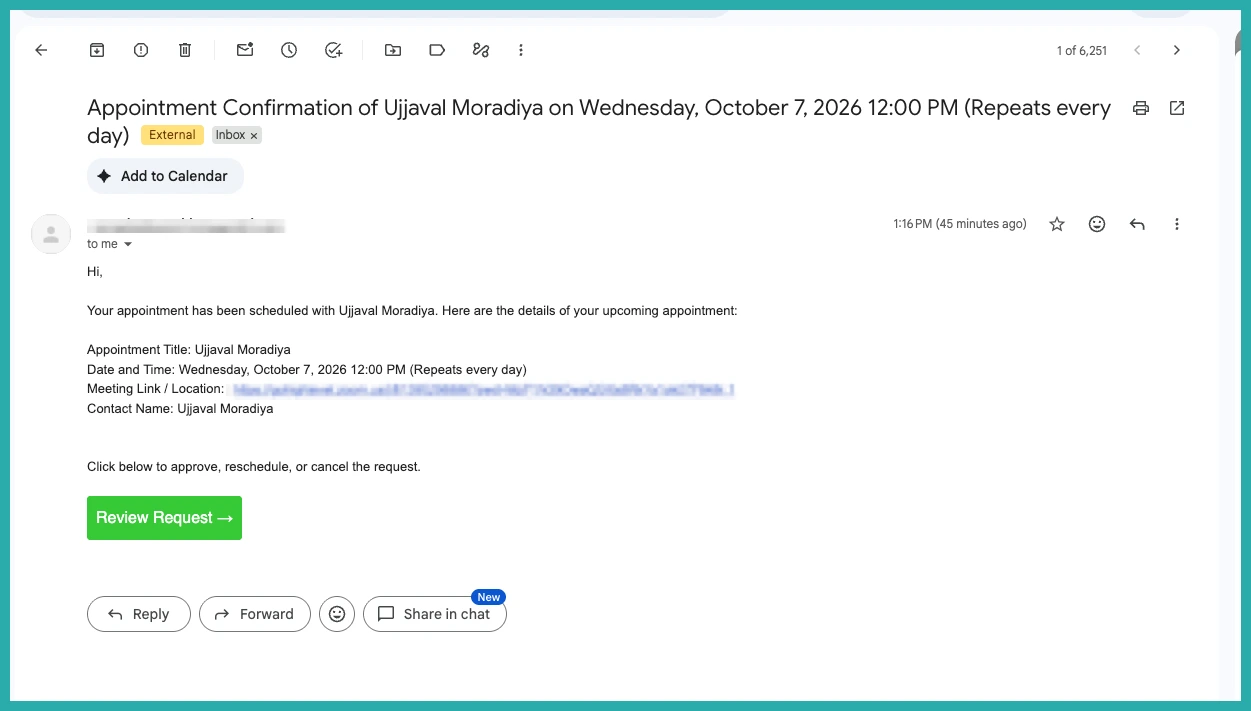
For custom recurrences, notifications now show the recurrence pattern right alongside the specific date and time. So instead of just a date, your client sees something like October 14, 2026 12:00 PM (reoccurs every Thursday).
That little detail makes a real difference. When a change goes out, the recipient can tell at a glance whether it affects one session or the whole series.
How to use it
There's nothing to switch on. These improvements are already working across your calendar notifications.
One small thing worth checking: to include those recurrence details, make sure your notification template uses the appointment date and time custom value. That's what pulls the pattern through.
Worth noting these changes apply to calendar notifications only - your workflows aren't affected.
If you run any kind of recurring booking, you don't need to do a thing. Your clients just get clearer, calmer communication from here on.
