
Automatically Sync Facebook Posts into Social Planner
How It Works
ESC Hub now allows you to automatically sync your existing Facebook posts directly into the Social Planner.
Once enabled, the system imports posts from the last 30 days and displays them alongside your scheduled and published content. This creates a centralized view of your social media activity, helping you manage both past and upcoming posts in one place.
The sync runs automatically in the background and keeps your data updated daily, ensuring your analytics and content history remain accurate.

How to Use It
Setting up Facebook Post Sync is quick and simple.
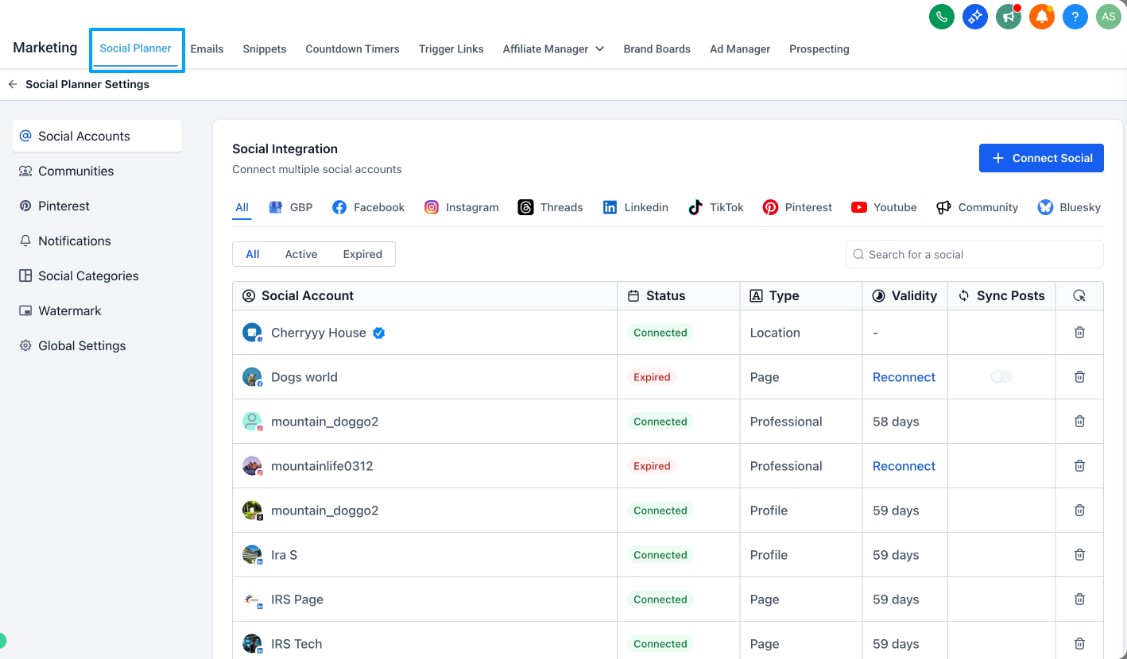
Go to Marketing → Social Planner → Settings
Ensure your Facebook account is connected
Enable Post Sync for the Facebook page you want to sync
The system will automatically begin syncing posts
Once enabled, posts will begin appearing in both Planner and Statistics, allowing you to view your historical Facebook content alongside scheduled posts.
Why This Matters
Many businesses already have months or years of Facebook content that isn’t visible inside their scheduling tools.
This update solves that by bringing your recent posts directly into Social Planner.
Benefits include:
• A complete view of past and scheduled content in one place
• No need to manually recreate existing Facebook posts
• Improved reporting and analytics for social performance
• Faster onboarding when connecting existing Facebook pages
Instead of managing past and future content in separate systems, ESC Hub now brings everything together.
