
Your Audit Reports Now Spot AI-Built Websites Too
When you run a Marketing Audit Report on a prospect, one of the handy bits is seeing how their website is actually built. It tells you a lot about the kind of help they might need from you.
That detection just got sharper.
What landed
The website hosting section of your audit reports can now spot sites built with AI Studio, the AI website builder. So when a prospect's site is powered by it, the report will name it correctly instead of leaving you guessing.
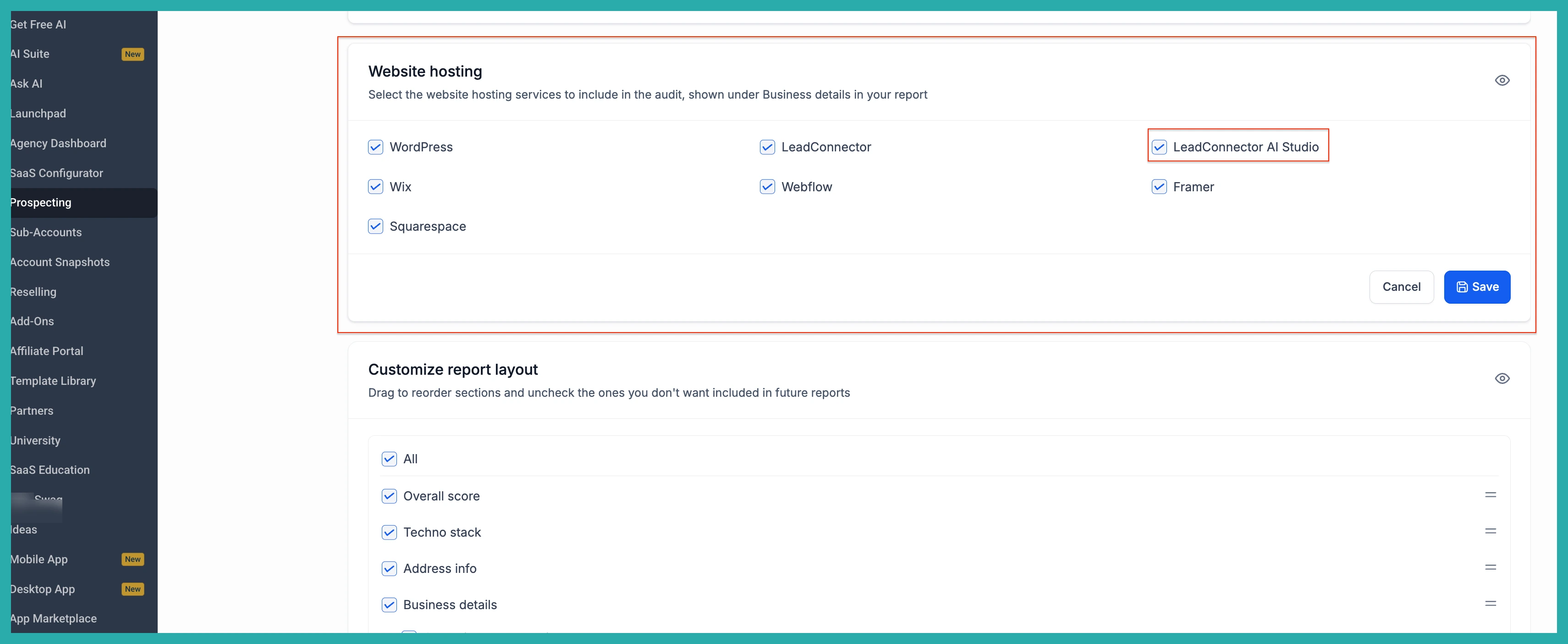
Here's the full list your reports now recognise:
- WordPress
- ESC Hub
- AI Studio (new)
- Webflow
- Wix
- Squarespace
- Framer
More businesses are turning to AI-generated websites, so having this in the mix means your audits stay accurate as the tech shifts. You get a truer view of what a prospect is running, and you can spot migration and website opportunities with more confidence.
Do you need to do anything?
No. AI Studio detection is switched on by default for everyone, on both Free and Premium Prospecting. Your next audit will simply be a little smarter.
If for some reason you'd rather leave it out of your website hosting checks, you can turn it off. Go to Prospecting, then Settings, then Report settings, and open Website hosting. Uncheck AI Studio and save.
That's the only step involved, and only if you want to change the default.
Run your next audit as normal and enjoy the clearer picture. The more you know about how a prospect's site is built, the easier it is to show up with exactly the right offer.
