
Linking Records Just Got Clearer: See a Label's Pair and Add a New One on the Spot
When you link two records together - a contact to a company, a company to an opportunity - you pick an association label to describe the relationship. Simple enough, until two labels look almost the same and you're not sure which side you're choosing.
That guesswork is gone. The label picker now shows you more, and if the label you need doesn't exist yet, you can make it without leaving the record.
See each label's pair at a glance
Every label in the dropdown now shows the label it pairs with on the other record. So instead of just seeing "Owned company", you'll see it with "Paired with Owner" underneath.
That little line tells you exactly which side of the relationship you're picking, so you get it right the first time.
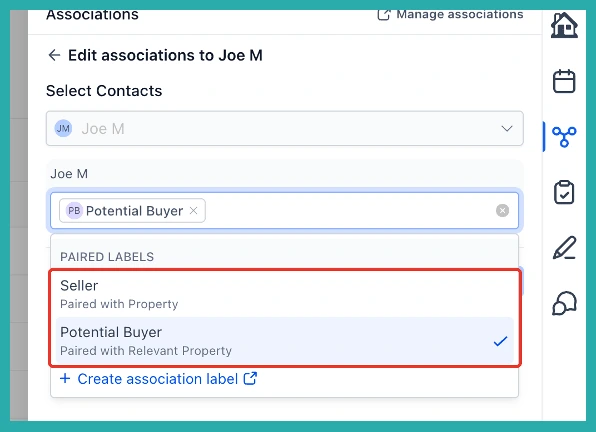
This shows up everywhere you link records - Contacts, Companies, Opportunities and Custom Objects - whether you're working in the side panel or on the full record page.
Create a missing label without the hunt
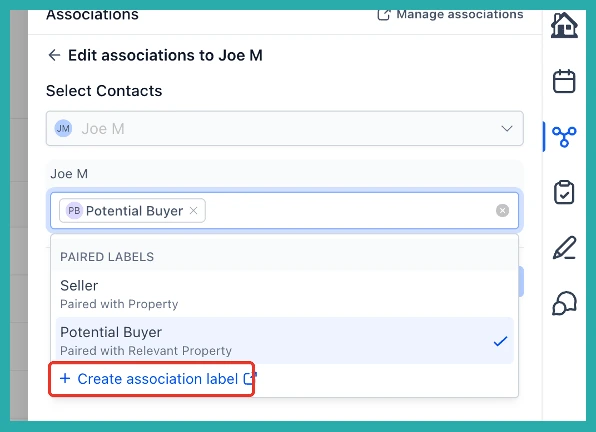
Here's the part that saves real time. If the label you want isn't in the list, admins now get a Create association label row at the bottom of the picker.
Click it and the create form opens with the other object already selected for you. No digging through Settings to find the right page. Add your label, come back to the record, and select it.
How to use it
- Open a record and go to Associations.
- Click Add, or choose Edit label on an association card.
- Open the label dropdown and read the "Paired with" text under each label.
- Admins: click Create association label at the bottom of the list to add a new one, then return to the record and pick it.
A few things worth knowing
- The create shortcut only shows for users who can manage associations, so it's an admin thing.
- If the two objects have hit their label limit, or can't be associated, the shortcut is hidden.
- Want to keep the picks you've already made? Use the arrow icon to open settings in a new tab, so nothing unsaved gets lost.
Next time you're linking records, take a second to read the paired text. It's a small change that takes the second-guessing out of a job you probably do more often than you realise.
